- A second device or a second operator can show some drift. Coverage still depends on the channel, the build, and the risk. Two units and one week are not a service cycle. A reference sample is the accepted configuration left unchanged, not an unconfigured unit.
| Check | Record | Not claimed |
|---|---|---|
| Two devices | A suggested way to look for drift | Not a one-week service |
| Second operator | Can show some drift | Coverage still depends on channel and build |
| Reference sample | The accepted configuration left unchanged | Not an unconfigured unit |
Can a Mainstream Android Phone Become a Controlled Project Device?
Yes—without changing the hardware or installing a custom ROM—but only for a recorded company-owned model, regional SKU, factory build, app, EMM, procurement route and test scope. One successful enrollment does not prove recovery or repeatability. This guide is the accept / conditionally accept / reject protocol for one named candidate handset, including how each control class is actually tested and why a second unit decides the verdict.
Diperbarui
Define the Exact Candidate Before Testing
“Mainstream” describes a commercial product family, not its ownership state. This guide concerns newly procured or factory-reset organization-owned units, not an employee’s personal phone. A controlled project device is an exact phone with a documented app, policy, enrollment, recovery and acceptance state for one defined use. It is a Vantora project term, not a Google certification or permanent product grade. The distinction matters because almost every disappointing evaluation traces back to a candidate that was never pinned down: a model name was tested, a specific unit was bought, and the two were assumed to be the same thing. A phone family can span several regional variants, two or three memory configurations, a carrier-branded build and a factory image that changed twice during the quarter you were testing in. Write the candidate down to the level at which it can be reordered, and the rest of the protocol has something stable to attach evidence to. If the candidate cannot be specified at this level — because the channel sells whatever is in stock, or because the supplier will not commit to a build — that is already a finding, and it belongs in the verdict rather than in a footnote.
- Exact model, regional or carrier SKU, memory variant, supplier and purchase channel.
- Android version, firmware build, security patch, GMS/AOSP route and factory setup state.
- App package and version, selected EMM, intended ownership mode and mandatory controls.
- Target markets, networks, SIM/eSIM assumptions, chargers, docks and required peripherals.
- Published update and support information, substitutions, replacements and spares.
Takeaway. A second device or a second operator can show some drift. Coverage still depends on the channel, the build, and the risk. Two units and one week are not a service cycle. A reference sample is the accepted configuration left unchanged, not an unconfigured unit.
Confirm the Ownership and Management Boundary
Whole-device control depends on organization ownership and a supported clean-state provisioning route. The AOSP device-management overview distinguishes profile-owner and device-owner scope, while current Android provisioning guidance makes ownership, personal-use setting, token, method and management mode explicit. Freeze permitted personal use, target mode, wipe authority, EMM and enrollment route before testing. Stop if an employee-owned state is being treated as whole-device control or if erasure authority is unresolved. One property of this boundary decides how expensive a mistake is: ownership is fixed when the device is provisioned and cannot be switched afterwards from a console. A unit that completed setup as a personal device with a work profile does not become a device-owner unit because someone changes a setting; it has to be wiped and provisioned again. What can change later is the management mode applied on top of device-owner provisioning — moving between a fully managed configuration and the dedicated, single-purpose subset of it is a policy change, and the difference between those two modes is the subject of dedicated vs fully managed Android devices. Record which of the two you are testing, because a control that behaves acceptably in a fully managed configuration can behave differently once the device is pinned to a workflow.
| Boundary | Decision to record | What it does not prove |
|---|---|---|
| Ownership | Organization-owned, permitted personal use and data authority. | That every policy is supported on the exact phone. |
| Management | Target mode, EMM/DPC, tenant and policy revision. | That app, kiosk, peripheral or recovery behavior works. |
| Enrollment | Starting state, method, token or assignment, reseller and network prerequisites. | That a similar retail unit follows the same supply-chain route. |
| Recovery | Authorized wipe/reset operation, FRP and intended re-enrollment outcome. | Command receipt, complete erasure or restoration of the accepted state. |
Run the Six-Step Exact-Device Conversion Protocol
The goal is a bounded Device Fit Verdict, not a general statement about a model family. Run the protocol on the intended production ownership mode, enrollment route, app, policy and purchase channel. For zero-touch, verify the documented reseller registration, configuration, software and network prerequisites on the exact unit rather than assuming a retail device with the same family name is eligible. Two disciplines make the difference between a protocol and a demonstration. The first is order: each step assumes the one before it passed, so a failure is recorded where it occurred rather than rediscovered three steps later with the cause already lost. The second is that the tester writes the staging instruction as they go, in enough detail that another person could reproduce the result without asking a question. That instruction is the real deliverable of steps two and three — the accepted state is only useful if it can be rebuilt — and it is what a second tester follows in step five. An evaluation normally consumes one to three units: Unit A carries the full protocol including the destructive drills, Unit B receives the confirmation pass, and a third is held back untouched as the reference against which later batch staging is compared.
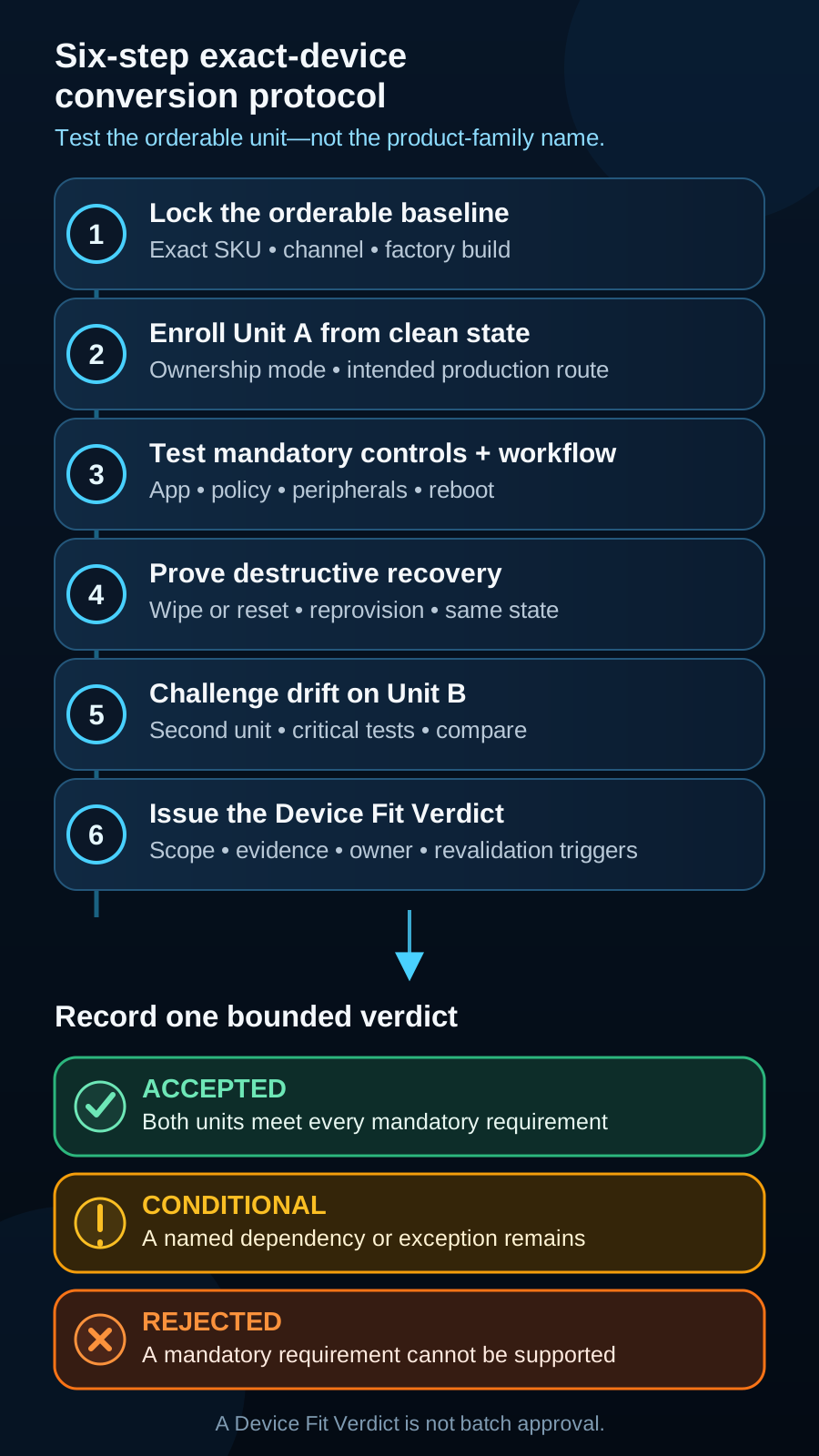
- 1Lock the orderable baseline: capture the label, exact SKU, firmware, patch, supplier and intended channel.
- 2Enroll Unit A from a clean state: record reset condition, network, tenant, token or configuration, policy and final state.
- 3Test mandatory controls and workflow: app install, first run, authentication, permissions, offline use, updates, peripherals and kiosk exits.
- 4Break the sample and prove recovery: interrupt setup, reboot, remove connectivity, reset or wipe, then restore the accepted state.
- 5Challenge the result with Unit B: repeat critical identity, enrollment, workflow, control and recovery checks from the intended route.
- 6Issue a one-page Device Fit Verdict naming scope, evidence, limitations, owners and revalidation triggers.
How to Test Each Control Class on the Sample
Step three is where most evaluations are weakest, because a control that appears in a console is easy to mistake for a control that holds on the device. A policy is a request; the accepted state is what the exact build actually does with it. Testing therefore has to be adversarial and specific: for each control the tester needs the mechanism that applies it, the action that exercises it, the observable result that counts as a pass, and the route a real user is most likely to find around it. Which layer owns each control — launcher, lock task, fleet policy or OEM integration — is set out in custom launcher vs kiosk mode vs MDM; this page is about proving the control on one candidate handset. Two mechanics govern most of the results below. Lock task blocks activities belonging to packages outside the allowlist, so the exposure that matters is never the blocked app — it is navigation inside an app that is allowed, and any system handler the workflow needed permission to use. And application-level restriction depends on fields the developer chose to publish through managed configuration; an EMM cannot invent a setting a browser or scanner app never exposed. Test on the production build with the production app version, from the accepted state rather than from a bench device with developer options left on, and write each result as a verdict with an owner. The row structure below is the same one the sample acceptance matrix uses, so the test log becomes the acceptance record instead of a document someone has to transcribe later. Where a control is genuinely unavailable on this hardware and build, that is a finding to record, not a test to quietly drop.
| Control class | How it is applied | Test to run on the sample | What a pass looks like | Bypass to probe first |
|---|---|---|---|---|
| App allowlist — which apps may run | DPC as device owner sets install type per package and the managed Play behaviour; the lock task allowlist decides which packages may be pinned | From the accepted state, try to launch a non-approved app from the launcher, a share sheet, a deep link, a notification action and a search result | Only approved packages start; a non-allowlisted activity is refused rather than briefly visible before closing | Navigation inside an allowed app — embedded web views, help screens, document viewers and permitted system handlers stay reachable |
| Browser and web access | Managed configuration published by the browser app, or a purpose-built web view shell where the browser exposes no usable fields | Open a blocked destination directly, through a link inside the workflow app, through a redirect and after a browser update | Blocked destinations fail on the exact browser version recorded, and the approved workflow still completes | A second browser or web view arriving with an app update, and in-app browsers that ignore the managed configuration |
| Settings access | Individual user restrictions plus lock task features that suppress the shade, quick tiles and overview — there is no single blanket switch for Settings | Attempt to reach settings from the launcher, notification shade, quick tiles, search, share sheet, an intent raised inside the workflow app and any OEM shortcut | Every route either fails or lands on a screen where the restricted item is unavailable, with no path to network, accounts or developer options | Deep links to a single settings page — Wi-Fi, language, accessibility, default apps — that the individual restrictions applied do not cover |
| Installing from unknown sources | Unknown-sources user restrictions applied by the device owner, with distribution limited to the managed channel | Attempt to install a downloaded APK from a file manager, a browser download, a USB transfer and any in-app updater on the accepted build | No installation completes, and the failure is a clear policy refusal rather than a crash or a silent partial install | An allowed app carrying its own updater, and a file manager admitted because the workflow needed it |
| USB access and developer debugging | Debugging and USB user restrictions; USB data signalling control is available from Android 12 on supported hardware | Connect the unit to a workstation, attempt file transfer and an ADB connection, then try to enable developer options from whatever settings path remains reachable | Debugging cannot be enabled and the workstation sees only the connection state the requirement allows | Debugging switched on during bench testing and never cleared before the unit was accepted or staged |
| Factory reset and reset recovery | Factory-reset user restriction, plus factory reset protection bound to authorized accounts where the platform and build support it | Attempt a user-initiated reset from settings, attempt a reset from the recovery path using the hardware key sequence, then complete first boot and observe where the device lands | The blocked route is refused; any route that is not blocked ends in the documented recovery outcome rather than an open consumer device | Recovery-mode and OEM reset tools, which are model- and build-dependent and must be tested on the exact unit rather than assumed |
| Network, Wi-Fi and VPN | Network configuration restrictions, managed network profiles pushed by policy, and always-on VPN with lockdown where the requirement needs it | Try to join an unapproved network, remove the managed network, run the workflow with the VPN stopped, then hold the unit off network for the agreed offline window | The device stays on approved connectivity, the workflow behaves as documented while offline, and no restriction relaxes silently during the disconnection | Tethering, a personal hotspot, a second SIM or eSIM profile, and Bluetooth network sharing |
| Camera, sensors and peripherals | Device-wide camera disable and per-app camera permission are different mechanisms. A global camera-off policy does not also mean “camera on only in one app.” Bluetooth, NFC, scanner, RFID and key remapping sit with the OEM. Do not assume every EMM or model supports a fine-grained exception. | Attempt capture from the workflow app and from every other allowed app, pair the intended peripheral, then attempt to pair an unapproved one and reboot with the peripheral attached | Capture is available exactly where the requirement says and refused elsewhere; the intended peripheral survives reboot and the full shift-length workflow | Capture reached through a permitted system handler — document scan, attach-photo — from inside an allowed app |
| Accounts and sign-in | Account-modification and account-type restrictions from the device owner; the application’s own authentication is a separate layer the DPC does not reach | Try to add a personal account at the system level, then try to sign in with a personal account inside each allowed app, and check what a shift handover leaves behind | System-level account changes are refused, and app-level sign-in and sign-out behave as the shared-device workflow requires | In-app sign-in and cloud sync, which system account restrictions do not reach, and cached credentials surviving handover |
| Notifications and system UI | Lock task features decide whether the notification shade, status bar, overview and global actions remain reachable while the device is pinned | Raise a notification from an allowed app and from a system source while pinned, pull down the shade, long-press power and try the overview gesture | Only the system UI elements named in the accepted configuration appear, and none of them opens a route out of the workflow | A notification action or quick tile that launches an activity outside the allowlist, and system dialogs raised by an update or a low-storage warning |
Break the Sample and Prove Recovery
A device that has only ever been switched on and enrolled has not been tested; it has been demonstrated. Step four exists because the states that cost money in the field are the ones nobody produced on the bench: a unit that rebooted at the wrong moment, lost its network for a day, was reset by a curious user, or came back from a firmware update with a different behaviour. Each of these has to be produced deliberately on Unit A and the return path recorded — not merely whether the device recovers, but how long it takes, who can do it, and whether the recovery needs a workstation, a network, credentials or a bench visit. Recovery time is a commercial number as much as a technical one, because it sets what a field failure costs across the eventual fleet. Run the drills as a sequence rather than a checklist. Interrupt provisioning halfway and see whether the unit resumes, stalls in a half-managed state or has to be started again from a wipe. Reboot repeatedly and confirm that the launcher, the pinned app, the policy and any peripheral pairing all return without a human touching the screen. Force-stop the workflow app and let the battery run to shutdown. Remove connectivity for the agreed offline window and confirm that the restrictions hold, the queued data syncs cleanly on reconnection and the console’s last-seen timestamp is understood for what it is — a stale entry is not evidence of a healthy device. Then attempt the reset that a user would attempt, execute the authorized wipe that an administrator would issue, and re-enrol the unit through the production route to see whether it genuinely returns to the accepted state or to something that merely resembles it. Anything that does not return without intervention is a limitation with an owner, not a rough edge, and it belongs in the known-limitations library before the verdict is written.
- Interrupt provisioning: confirm the unit resumes or restarts cleanly rather than settling into a half-managed state.
- Reboot, force-stop and drain to shutdown: launcher, pinned app, policy and peripheral pairing must return unattended.
- Hold the agreed offline window: restrictions hold, queued data syncs, and a stale last-seen entry is not read as compliance.
- Attempt the user reset and execute the authorized wipe, then re-enrol through the production route and compare against the reference unit.
- Record recovery time, the tools required and whether a bench visit is needed — that number prices field failures later.
Why One Unit Is Never Enough: The Second-Unit Drift Test
Unit A is the unit that was configured by the person who understood the configuration, on a day when the firmware happened to be a particular build. That is exactly why it cannot decide the verdict on its own. Step five re-runs the critical checks on a second unit, ordered separately through the intended production channel, and hands it to a different tester who follows only the written staging instruction. The test has two targets: the device and the instruction. Drift between two units of the same model name is ordinary rather than exceptional. Factory images move between production runs, so the second unit can arrive on a different build and patch level and be updated to a third within an hour of first boot. Regional and carrier variants carry different preinstalled software and, occasionally, different modem behaviour. Zero-touch registration is a property of the purchase, not of the model, so a unit bought through a different channel can be ineligible for the route Unit A used. Unit A has also been contaminated by the evaluation itself — developer options enabled at some point, an account added, a firmware update accepted mid-test — and the fleet will never inherit that history. A drift finding is a result, not a failure of the test. Record what differs, whether the difference changes a mandatory result, and whether it can be controlled by specifying the SKU more tightly, fixing a build in the staging instruction, or restricting the channel. Differences that can be controlled become staging instructions; differences that cannot be explained become the reason a candidate stays conditional. This step is also where batch staging is rehearsed for the first time: if a second person cannot reproduce the accepted state from the written instruction, the instruction will not survive being handed to a staging line, and the gap is far cheaper to find now than after a program has been committed.
- Order Unit B separately through the intended production channel, not from the same box or the same reserved stock.
- Hand it to a different tester who has only the written staging instruction — the instruction is under test as much as the device.
- Compare build, patch level, preinstalled software, provisioning eligibility and every mandatory control result.
- Classify each difference: controllable by SKU, build or channel specification, or unexplained and therefore a condition.
- Keep a third unit untouched as the reference the staged batch is later compared against.
Use Accepted, Conditional or Rejected—Nothing Vague
The verdict is narrower than full rollout approval. It applies only to the recorded units, SKU, build, channel, app, EMM and market scope. Conditional is the verdict that does the most damage when it is written carelessly, because it is the one that gets read as a yes. A conditional acceptance is honest only when it states, in one place, what is open, who owns it, what test will close it, by when, and what happens if it does not close. It must also say what is not approved in the meantime — normally that no batch quantity may be committed and no delivery date may be quoted against the open item. A conditional acceptance without a named owner and a date is a rejection wearing a more comfortable label, and it will surface as a delivery problem months later, at the point where it is most expensive to admit. Two further habits keep the verdict usable. Cap the conditions: a candidate carrying more than a small number of open items is not a conditional pass but an unfinished evaluation, and the honest move is to keep testing or change the candidate. And separate a condition from a limitation. A condition is expected to close, so it has a test and a deadline; a limitation is a permanent property of this device and configuration that the approver accepts with eyes open, and it belongs in the limitations log with the behaviour described plainly rather than softened. Both are written into the record before the verdict is signed, so the person approving the spend is reading the same document as the person who ran the tests.
| Verdict | Use it when | Required next action |
|---|---|---|
| Accepted | Both representative units pass every mandatory test for the recorded scope. | Preserve the reference state and move into formal rollout acceptance. |
| Conditional | The phone appears viable, but a dependency, exception, second-unit result or owner remains open. | Resolve the condition and repeat the affected tests before approval. |
| Rejected | A mandatory control, workflow, recovery, market, supply or lifecycle need cannot be supported. | Select another existing model or open a bounded deeper-feasibility review. |
Takeaway. A camera block at device level is not the same control as per-app permission. Do not write both as one pass condition.
Send a redacted brief. We reply within 1 business day.
Keep the OEM Baseline and Project State Separate
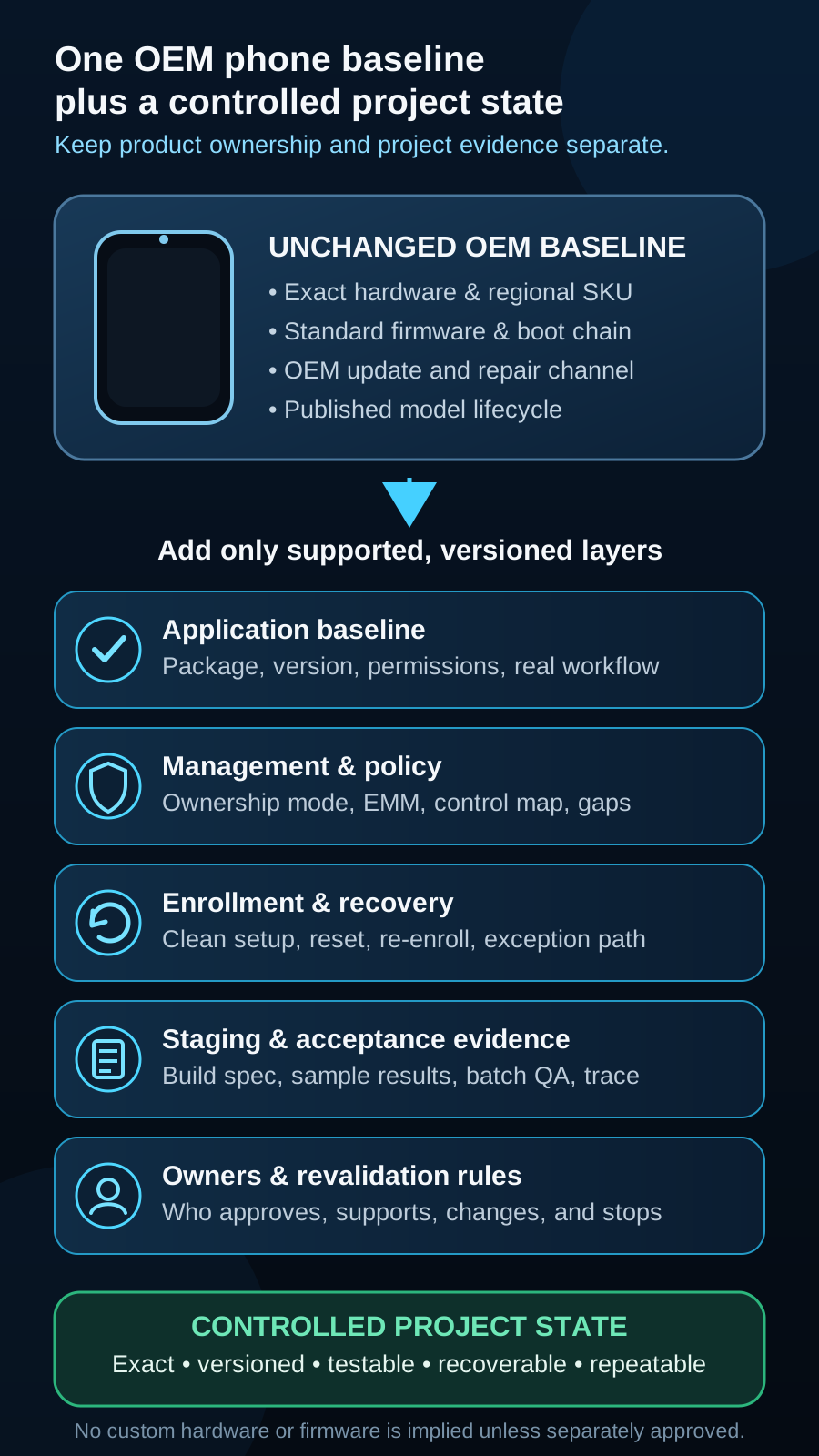
Using a mainstream phone does not make it custom hardware. The OEM still owns the standard hardware, boot chain, firmware, update channel and lifecycle. The project adds a versioned application, management mode, policy, enrollment route, staging instruction, test record, limitations and owners. System-update policy can govern installation timing where supported; it cannot make an OEM or carrier publish firmware or preserve the workflow after a change. The practical consequence is that the accepted state has an expiry condition rather than a permanent status. A firmware release the OEM ships for consumer reasons can change how a control behaves, retire a peripheral behaviour or reset a setting the workflow depended on, and none of that is visible in a management console until a device reports it. Name the revalidation triggers at the same time as the verdict — a major Android version step, a firmware or patch level outside the recorded range, a change of application version, a change of EMM tenant or policy revision, a new regional SKU or a change of purchase channel — and say who watches for each and what is retested when one fires. A candidate is accepted for a state, not forever.
Know When to Reject or Change the Candidate
Change the mainstream candidate when a mandatory requirement depends on unavailable hardware, environmental durability, a missing peripheral route, unsupported OEM control, unrepeatable recovery, uncertain regional supply or an inadequate lifecycle. Management cannot create a missing app, hardware, OEM or firmware capability. A short list of findings should end the evaluation immediately rather than being carried forward as conditions, because no amount of further configuration work changes them. The unit cannot be provisioned into the intended ownership mode from a clean state through the route the program will actually use — ownership is decided at provisioning, so no console setting recovers this. A mandatory control has no mechanism on any layer: not policy, not the application, not a vendor framework on this build. The candidate is only obtainable through a channel that cannot produce the same SKU and build again, or cannot invoice and support it in the target market. The regional variant lacks a band, radio approval or certification the deployment requires. No published update or security-patch information covers the intended deployment horizon. Or the two units differ on a mandatory result in a way nobody can explain or control. Rejecting early is the cheap outcome. A second device or a second operator can show some drift. Coverage still depends on the channel, the build, and the risk. This page does not treat two units or one week as a service cycle. When rejection points at a requirement no mainstream product can satisfy rather than at this particular phone, the next question is a different one entirely — whether a configured standard device, a rugged or purpose-built product, or deeper custom work is the right path — and that comparison is made in custom vs off-the-shelf Android devices.
- A console setting exists but the exact build does not produce the required result.
- The app or peripheral fails the real workflow or cannot recover from the agreed reset state.
- The regional SKU, channel or second unit differs in a way that changes a mandatory result.
- Supply, repair, update or replacement evidence cannot support the required deployment horizon.
- A material gap has no owner, supported route or acceptable limitation.
Hand the Verdict into Rollout Acceptance
An Accepted Device Fit Verdict authorizes the next validation stage; it is not batch approval. Preserve the candidate identity, scope, results, exceptions, owners and evidence links, then define the app, policy, provisioning, market, staging and batch acceptance baseline. Use the MDM-Ready vs Rollout-Ready guide for the wider evidence set and Android Device Provisioning Methods for the production route. What carries forward is deliberately narrow: the version-controlled sample that fixes model, SKU, build, app version, policy revision and provisioning route; the acceptance matrix rows produced by the control tests and recovery drills, each with a verdict and an owner; the limitations log; and the staging instruction that a second person already proved they could follow. Batch staging then reproduces that state rather than reinventing it — the same route, the same policy revision, the same application build, checked unit by unit against the reference sample, with a stop rule that halts the line when a unit deviates instead of letting the deviation become the new normal. Vantora quotes programs from around 500 units upward, and a pilot tranche of twenty to a hundred devices inside the program is the usual way to confirm the evaluation in real operating conditions — real users, real sites, real network — before the remaining units are staged. The evaluation described on this page is what makes that pilot worth running: without it the pilot discovers device problems, and with it the pilot is free to discover the workflow problems that only appear at scale.
Request a Device Fit Review
Share the exact model or shortlist, purchase channel, target countries, ownership model, app and EMM state, mandatory controls, quantity range, lifecycle need and acceptance priorities. An end-customer name and confidential commercial detail are not required for the initial review. If a candidate has already been tested internally, send the test log as it stands — including the checks that were not run — because the fastest reviews start from an honest partial record rather than a summary.
What to send us
| Item | Why we need it | Example format |
|---|---|---|
| Exact SKU and channel | The test is worthless on the wrong unit | SKU and where it was bought |
| Current build | Policy is build-specific | Firmware and security patch |
| Mandatory controls | What must be true after setup | Allow and block list |
| Workflow | The job the phone must finish | Steps |
| EMM | The console that will apply policy | Product name |
| Tests already run and failure logs | Start from evidence you have | Log excerpt, or none |
Send a redacted brief. We reply within 1 business day.
Pertanyaan Umum
Is a mainstream Android phone automatically unsuitable for a company deployment?
No. A commercial phone can be valid when its exact SKU, build, ownership mode, app, controls, recovery, channel and lifecycle pass the protocol. The mainstream label neither qualifies nor disqualifies it.
Does successful MDM enrollment mean the phone passes?
No. Enrollment proves one step. The mandatory workflow and controls, authorized recovery drill and second-unit drift check must still pass.
How many units should be tested before approving a model?
Plan for two units tested and a third held back. Unit A carries the full protocol including the destructive recovery drills, and Unit B — ordered separately through the production channel and configured by a different person from the written staging instruction — confirms that the result was a property of the model rather than of one box and one tester. The third unit stays untouched as the reference the staged batch is compared against. One unit cannot expose the differences that matter most in practice: factory build and patch level moving between production runs, regional or carrier variants carrying different preinstalled software, provisioning eligibility that belongs to the purchase rather than the model, and the configuration history the first unit accumulated during testing.
How do I actually test that a control is enforced rather than just configured?
Test from the accepted state on the production build and application version, and try to defeat each control the way a user would. For every restriction there is a mechanism, an action that exercises it, an observable pass and a likely bypass — the per-control table above sets these out for app allowlist, browser access, settings, unknown-sources installation, USB and debugging, factory reset, network and VPN, camera and peripherals, accounts and notifications. Two mechanics explain most surprises: lock task blocks packages outside the allowlist but does not police navigation inside an app that is allowed or a system handler the workflow needed, and application-level restriction only exposes the fields a developer published through managed configuration. Every result is recorded as a verdict with an owner, and controls that cannot be enforced on this build are logged as limitations rather than dropped.
Can a previously used phone become fully managed?
Potentially, if it is organization-owned and the platform supports the route, but device-owner provisioning normally requires out-of-box setup or factory reset. Data handling, FRP and ownership authority must be resolved first. Ownership is fixed at provisioning and cannot be changed later from a console; the management mode applied on top of it — fully managed or the dedicated subset — is a policy change.
Does zero-touch work on any phone bought from any store?
No. The exact device must follow the supported reseller registration path and have a compatible EMM configuration and software state. A retail unit with the same model name is not automatically registered or eligible.
What should happen when the candidate is rejected?
Record the failed mandatory requirement and evidence, then select another existing model or open bounded OEM, firmware or hardware feasibility only when supported configuration routes cannot close the gap. A rejection should also state whether the failure was specific to this handset or to the requirement itself, because the second case changes the search rather than the shortlist.
Ceritakan alur kerja dan aturan Anda.
Kami mengubah persyaratan menjadi perangkat yang siap diterapkan.