Android Developer Verification 2026: Enterprise Rollout Checklist
See what Android Developer Verification changes on September 30, 2026, and how enterprise teams should prepare apps, channels, devices, and evidence.

Direct answer: On September 30, 2026, Android's initial developer-verification protections begin for users in Brazil, Indonesia, Singapore, and Thailand within the documented store and form-factor scope. This is not a ban on sideloading or every APK. Enterprise teams should identify the real distribution path, confirm package and signing ownership, and preserve deployment evidence before approving a fleet.
What changes on September 30, 2026?
This article was published on August 19, 2026. The operational milestone is September 30, 2026. Keeping those dates separate matters because verification, package registration, and rollout planning should happen before enforcement begins.
Android's current developer-verification guide says the initial protections go live for users in Brazil, Indonesia, Singapore, and Thailand. It lists Google Play, HONOR App Market, OPPO App Market, Samsung Galaxy Store, Transsion Palm Store, vivo V-Appstore, and Xiaomi GetApps as participating stores.
For distribution outside Google Play, the official FAQ says initial enforcement in those regions applies to mobile and tablet form factors. Google Play apps across all form factors must be registered. Broader preparation is sensible, but it should not be mislabeled as September enforcement.
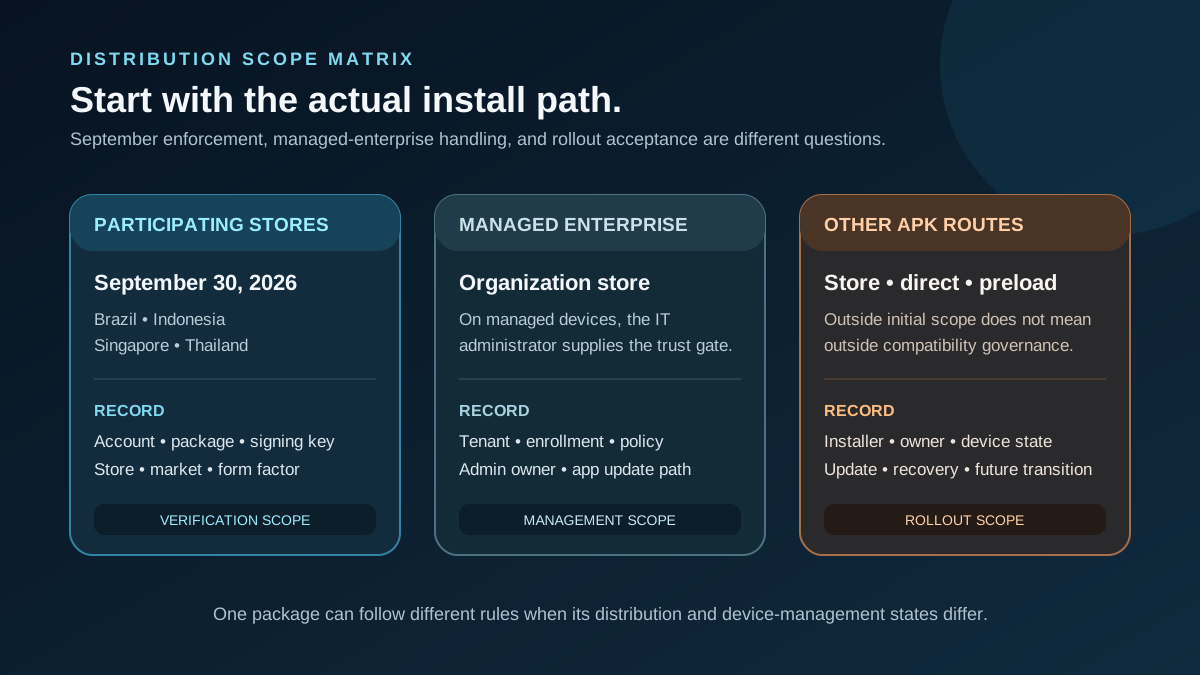
The first decision is the distribution path, not a generic yes-or-no answer about sideloading.
What does not change?
Android's material does not say sideloading is banned. The guide says apps can still be sideloaded, the ADB workflow remains unchanged, and power users can use an advanced flow for apps from unverified developers. The FAQ also says stores outside the initial list and direct sideloading are outside the September 30 enforcement phase.
The broader picture is still important: Android says protections will expand globally for apps on certified Android devices in 2027. Treat that as a reason to prepare reusable records, not as permission to overstate the 2026 scope.
The FAQ also distinguishes managed enterprise distribution: apps delivered through an organization store to managed devices do not need to complete verification because the IT administrator has vetted them. That exception does not automatically describe every factory preload, private APK, or unmanaged device. Document the actual route.
Map the distribution path before approval
| Distribution path | Official scope | Rollout evidence to keep | | --- | --- | --- | | Google Play | Use the Play Console verification and registration path | Account owner, package, signing key, update route | | Listed participating store | Initial protections apply within Google's documented scope | Store, package registration, markets, device form factor | | Organization store on managed devices | FAQ says verification is not required for this managed-enterprise case | MDM/UEM tenant, enrollment state, admin approval | | Other store or direct APK | Outside initial September enforcement | Installer, package owner, signing key, future transition plan | | ADB or advanced flow | Available, but designed for technical or power-user cases | Do not assume either is a routine fleet-distribution method | | Factory preload | No single cited rule covers every preload model | Installation authority, device state, registration, update owner |
For preloaded projects, pair this decision with Preload Apps on Android Devices at Scale. The installation method, update route, and management state are as important as the initial image.
Package ownership deserves its own review. A familiar package name does not prove that the organization controls the signing key used by every distributed build. Record which key signs the Play version, off-Play build, preload, and future update. If different keys or accounts exist, resolve the registration and update implications before devices leave staging. The evidence should connect the exact artifact to an accountable owner, not merely list a brand or app title.
Verification is not fleet acceptance
Developer verification links a real-world person or organization to application packages and signing keys. It does not establish that an app is safe, compatible with a candidate device, privacy compliant, MDM ready, approved by a regulator, or accepted by a customer.
That distinction matters in app-plus-device programs. A package can be properly registered while still failing a peripheral workflow, managed configuration, offline start, update, or recovery test. Use the App-Ready Android Device Checklist and App & MDM Integration guidance to define those separate gates.
Build a rollout evidence checkpoint
The following is a Vantora editorial framework, not a Google checklist.
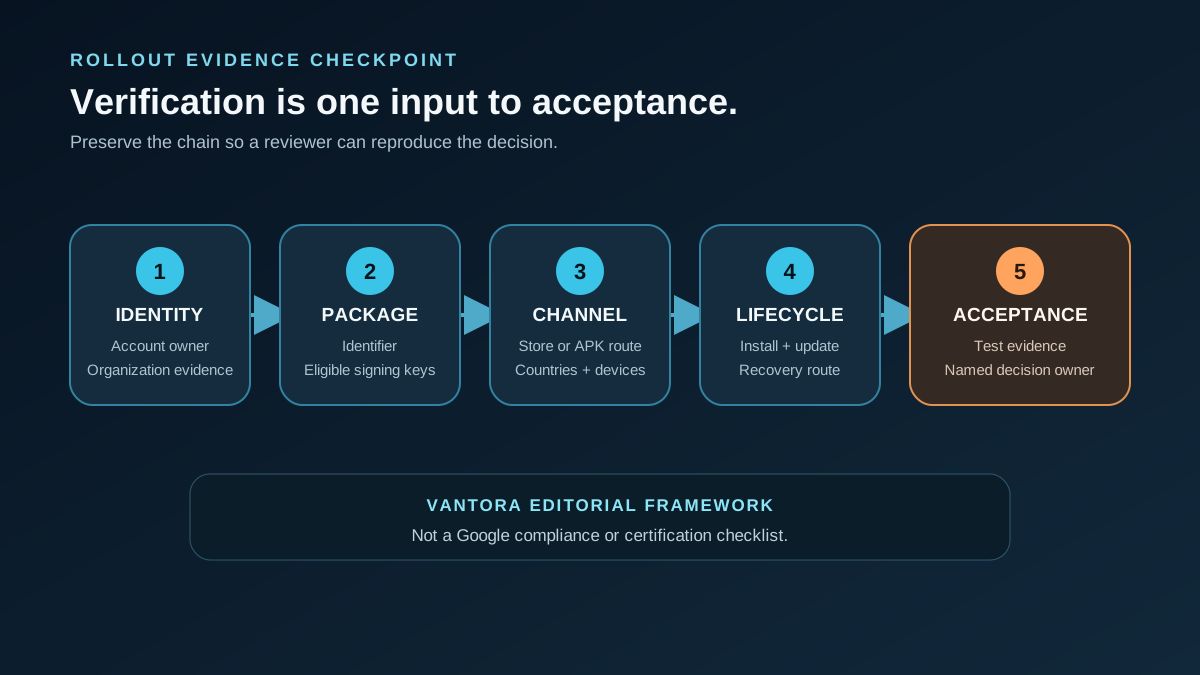
| Evidence item | Record before deployment | | --- | --- | | Package and signing | Exact package identifier, signing-key owner, eligible key evidence | | Developer identity | Account type and responsible organization or individual | | Distribution | Store, organization store, direct APK, preload, or another defined route | | Deployment scope | Countries, device models, form factors, certification and management state | | Update path | Store update, managed push, OTA-bundled app, or controlled APK process | | Acceptance | Test build, installation result, update/recovery evidence, named approver |
Attach ownership with a Sample Responsibility Matrix. This avoids a common failure mode: app, device, and operations teams each assume another party owns registration or updates.
Before approving a fleet rollout
Confirm that the team can answer five questions:
- Which distribution path is actually used?
- Who owns the package, developer account, and signing key?
- Which countries, form factors, device models, and management states are included?
- How will the app be installed, updated, and recovered?
- Which evidence and owner define acceptance?
If an answer is still an assumption, the checkpoint is incomplete.
For an external feasibility review, submit a redacted Project Brief with the package, channels, signing ownership, countries, devices, update path, management platform, and acceptance owner. A brief supports scoping only; it does not confirm eligibility, compliance, approval, certification, or rollout acceptance.
FAQs
Does Android Developer Verification ban sideloading?
No. Android explicitly says apps can still be sideloaded and documents routes for verified, limited-distribution, and unverified developers.
Which stores are in the initial rollout?
Google Play, HONOR App Market, OPPO App Market, Samsung Galaxy Store, Transsion Palm Store, vivo V-Appstore, and Xiaomi GetApps.
Are managed enterprise apps exempt?
The FAQ says apps distributed through an organization store on managed devices do not need verification. Confirm that the project actually matches that managed-enterprise case.
Does verification prove deployment readiness?
No. Compatibility, MDM, peripherals, privacy, certification, and customer acceptance remain separate workstreams.
How should a factory-preloaded app be reviewed?
Record who installs it, how its package and keys are controlled, whether devices are managed, and how updates and recovery work. Do not infer one universal rule from “preload.”
Official sources
- Android developer verification guide
- Android developer verification FAQ
- Developer verification rollout announcement
- Play Console package registration guide (PDF)
Unverified or conditional claims
- No single cited rule covers every factory-preloaded deployment; installation, management, and update models vary.
- Participating stores may have processes beyond the common verification scope described by Android.
- The evidence checkpoint above is Vantora editorial guidance, not an official Google acceptance checklist.