Custom Android Tablets for Education and Community Programs
Organization-issued, branded and policy-controlled Android tablets for learning, NGO and community programs — preloaded with the right apps and centrally managed so every participant gets the same experience.
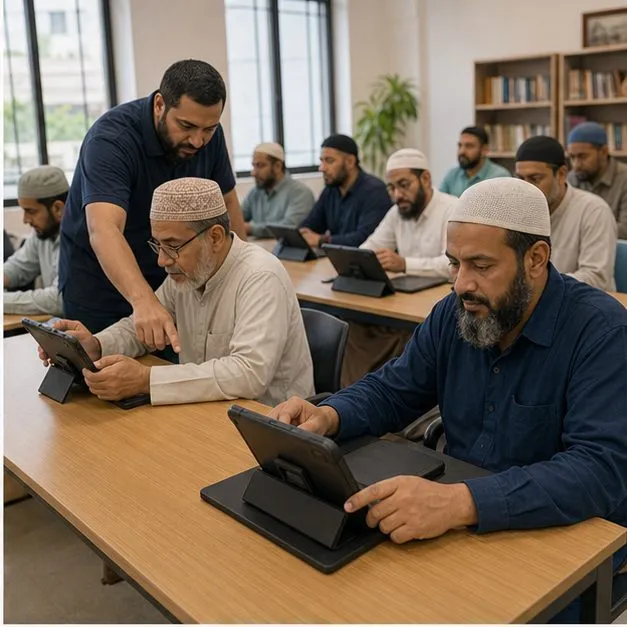
A Consistent Device Experience for Every Participant
A device program works best when every participant receives the same organization-issued tablet rather than a mix of personal devices configured by hand. We help define a consistent configuration for an education tablet or community device so the home screen, installed apps and policies are identical across the fleet. That consistency is what makes a learning or outreach program supportable at scale, since staff and participants meet the same setup wherever a device is used. The hardware side of these programs is covered in custom Android tablets.
Branded Content and Preinstalled Learning Apps
The tablet can carry your organization branding through a boot logo, wallpaper and default language so it feels like part of the program from first power-on. A learning app or content library can be set as the preloaded default, and offline content can be bundled where connectivity is limited in the field. These branding and app-preload layers are OEM- and platform-dependent and are confirmed against the chosen hardware before a build is committed.
- Organization branding via boot logo, wallpaper and packaging
- Default language and region set per program
- Learning app and content library preloaded as the default experience
- Offline content bundled for low-connectivity sites where the platform supports it
Focus, Student and Child-Friendly Modes
For learning and community use, the device can run a focus mode or a dedicated student mode that limits the apps and content available during a session. A child profile, app restriction, web filtering and screen-time policy can be configured for the program, and a reading mode can be offered where the hardware supports it. These are described as configurable controls rather than guarantees, since each behaves differently by device, OEM and management stack and is subject to technical validation.
Administration and Ongoing Device Management
A program needs a way to keep devices current after rollout, not just at handover. Centrally managed tablets let an administrator push an app update, maintain a device inventory and apply a usage policy across the fleet from one place. Where a tablet is lost, remote restriction can be applied subject to device and management-stack validation, and the support boundary between us and the program owner is documented so it is clear who handles what.
Content, Account and Cloud Integration
Where a program runs its own course schedule, membership or account system, the device experience can be wired to it through login and synchronization. Content updates and account state can flow from your platform to the tablet over an agreed API so the device reflects the same data participants see elsewhere. We define the integration boundary up front and validate it during the pilot rather than assuming every backend connects cleanly.
Pilot, Safeguarding and Acceptance
Education and community programs carry privacy and safeguarding expectations, so a pilot group is run before any production batch. The pilot covers a test plan, accessibility needs and the parental-consent and data-handling questions specific to younger or vulnerable participants, with results checked against an agreed acceptance matrix. Known limitations are recorded honestly in the acceptance step so the program owner signs off with a clear picture rather than blanket assurances.
- Pilot batch validated against an agreed acceptance matrix
- Parental-consent and privacy handling addressed for younger participants
- Accessibility requirements reviewed as part of the test plan
- Known limitations documented before batch approval
Anonymized Middle East Organization Experience
In one anonymized Middle East program for a faith-based organization, the work combined custom branding with dedicated apps to build a vertical tablet experience around the organization’s own content and routines. The engagement moved from a requirement table through feasibility and timeline into a validated device build. The case is documented in redacted form to protect confidentiality while showing the scope of a vertical device program.
FAQ
Can the tablets work for offline learning?
Offline content and a learning app can be preloaded so core material is available without connectivity, depending on the app and the chosen hardware; the offline behaviour is OEM- and platform-dependent and confirmed during the pilot.
Do the tablets include Google Play and Google services?
Google Play availability depends on whether the device build is GMS- or AOSP-based; both paths are possible and the choice is made per program, subject to technical validation on the selected hardware.
Can we set parental controls and child profiles?
A child profile, app restriction, web filtering and screen-time policy can be configured for the program; these are configurable controls rather than guarantees and behave differently by device and management stack.
Can the home screen use a custom launcher?
A custom launcher or dedicated home screen can be set so the device opens directly into the program apps, configured for MDM/EMM and validated against the chosen hardware before rollout.
What is the minimum order, and how are app updates handled after rollout?
Programs quote from around 500 units upward, typically starting with evaluation samples and a pilot tranche before the production batch; after rollout, app updates can be pushed centrally to the fleet by an administrator where the management stack supports it.
Tell us your workflow and rules.
We turn requirements into deployment-ready devices.