- Prefer the lightest path that can be validated. A layer number does not freeze firmware or inherit patches. A boot logo with firmware left untouched is a condition to confirm, not a guarantee.
| Check | Record | Not claimed |
|---|---|---|
| Boot animation | May sit above an untouched firmware | Confirm the install path |
| System preload | May cross the layer number | Not automatic patch inheritance |
| Firmware change | A deeper deliverable | Not implied by a boot logo |
What Is a Custom Android Device?
A custom Android device is a smartphone or tablet whose build is fixed for one business requirement, then reproduced the same way on every unit in the batch.
Diperbarui
A Practical Definition
A custom Android device is a smartphone or tablet whose configuration has been fixed around a specific business requirement rather than left open for an individual owner to personalize. The base hardware is usually a proven Android phone or tablet already in volume production; what changes is the layer above it — branding, pre-installed software, the default experience, management policy and, in a minority of programs, firmware or components. The device arrives purpose-specific: it opens to the tool the organization issued it for, it enforces the restrictions the organization agreed, and it does so the same way on every unit in the batch. Purpose over personalization is what most people mean when they ask what a custom Android device is.
Takeaway. Prefer the lightest path that can be validated. A layer number does not freeze firmware or inherit patches. A boot logo with firmware left untouched is a condition to confirm, not a guarantee.
Why Repeatability Belongs in the Definition
The property that short definitions tend to drop — the same way on every unit — is the one that decides whether a project succeeds. A configuration a technician can produce once on a bench is a demonstration. A configuration that can be written down in a build spec, proven on a version-controlled sample, signed off against an acceptance matrix and reproduced under a batch record is a device program. The engineering content of the two can be identical; the difference is whether the state is repeatable and evidenced. So the working definition used throughout this site is deliberately narrow: a custom Android device is an agreed device build — model and regional variant, Android version, firmware baseline, app set, policy set, packaging and market assumptions — that has been validated on a sample and reproduced under a batch record. Everything below describes what can sit inside that build, who each part depends on, and which guide owns the decision. The capability-by-capability view lives in Android device customization.
The Four Levels of Customization
It helps to think of customization as layers that stack rather than as a menu to shop from. Each level adds capability, cost and validation effort, and each one changes who has to be involved: a preload is a software task, a policy is an EMM task, and a firmware change is an OEM engineering task with an OEM lead time attached. Most programs resolve at the first two or three levels, and the fourth is the most constrained, validated case by case against the chosen hardware. The table below is best read in one direction only: the useful question is not what the deepest available level is, but what the lightest level that satisfies the requirement is. A program deliverable through branding, an app preload and an Android Enterprise policy is faster to build, cheaper to support and easier to update than one that requires a firmware fork, and it keeps inheriting the OEM security-patch stream instead of taking responsibility for it. Depth is a cost, not a feature. Where a requirement genuinely cannot be met by policy — a hardware button remap, a removed radio, a system-level restriction outside the standard policy surface — that is where the deeper levels earn their place, and the trade-off is set out in MDM vs custom Android ROM.
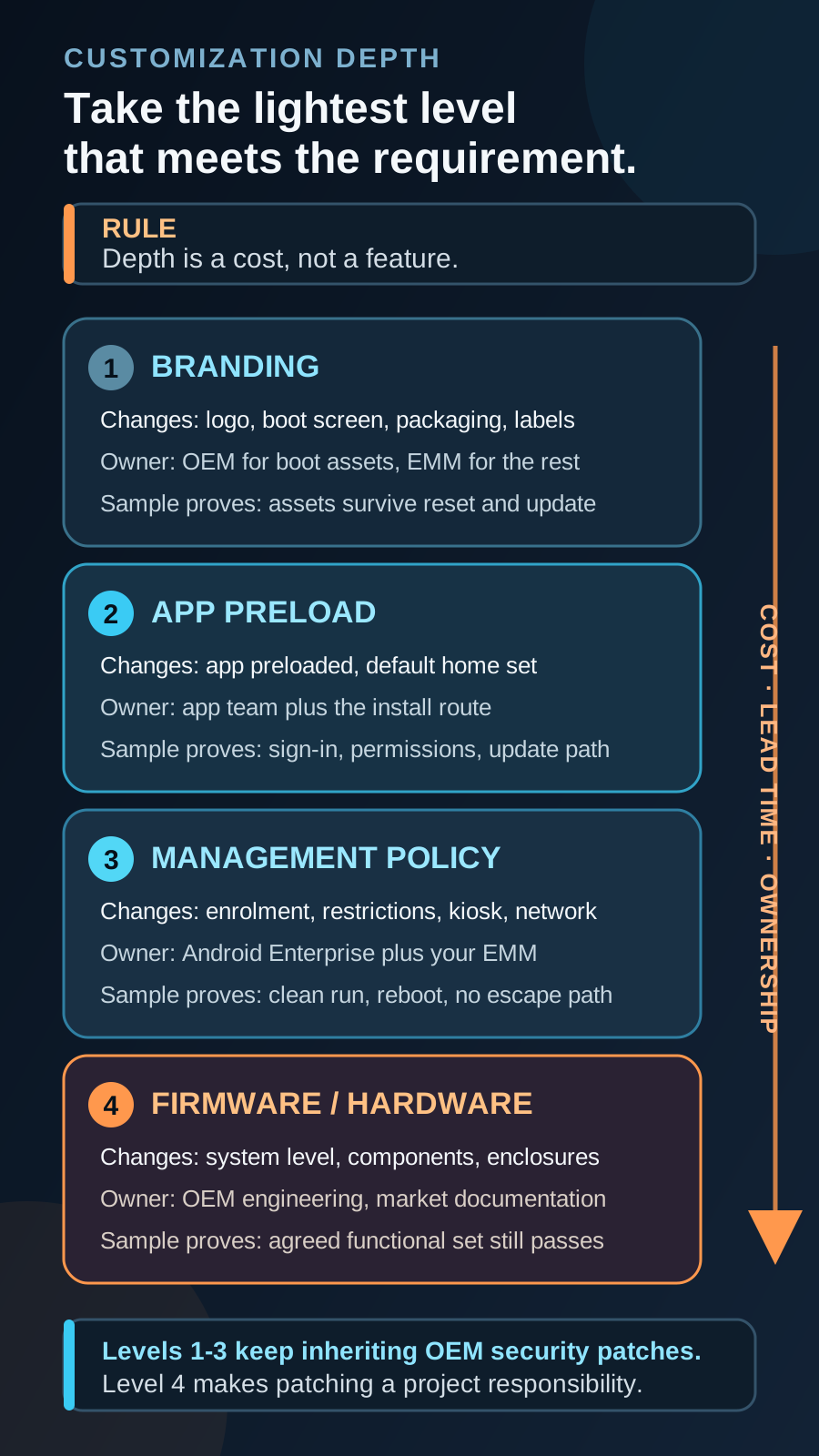
| Level | What changes | What stays stock | Typical dependency | What the sample must prove |
|---|---|---|---|---|
| 1. Branding | Logo, boot and shutdown screens, wallpaper, device name, packaging, manual, labels | Android build, app behaviour, management surface, patch stream | OEM for firmware-level assets such as the boot animation; EMM or launcher for wallpaper and device naming | Branded assets render correctly on the production firmware and behave predictably after a reset or update |
| 2. App preload and default experience | The organization app is bundled, a default home or launcher is set, unused apps are hidden, disabled or removed | Operating system, security patches, Google services where GMS is present | App team for the build, signing and update path; EMM or OEM depending on how the app is installed | The app installs, launches, signs in, keeps its permissions and updates through the agreed channel |
| 3. Management and policy | Enrolment mode, device-owner policy, app allowlist, restrictions, kiosk or dedicated-device lock, network, VPN and certificate profiles | Firmware, hardware, the OEM update stream | Android Enterprise plus the selected EMM; some controls depend on OEM extensions | Policy applies from a clean provisioning run, survives reboot, and the escape paths named in scope are closed |
| 4. Firmware and hardware | System-level changes, privileged app placement, removed or remapped components, housings, non-standard radios | Little — this level reopens compatibility, documentation and patch-maintenance questions | OEM engineering and build capacity; target-market documentation where radios or enclosures change | The modified build still passes the agreed functional set and the market documentation assumptions still hold |
What an Approved Sample Must Prove: Five Outcomes
Levels describe what can be changed. Outcomes describe what an organization actually owns when the program is finished, and for anyone specifying a custom device for the first time the outcome frame is the more useful one. Every accepted program resolves into five outcomes — Device Shortlist, App-Ready Build, Policy-Controlled Setup, Acceptance-Tested Sample and Batch-Staged Delivery — and each is proven at a specific point in the chain rather than asserted in a proposal. That makes the five outcomes the honest test to apply to any supplier, including this one: if a supplier cannot say where each outcome is confirmed and who signs it, the outcome is an intention rather than a deliverable. The table maps each outcome to the point in the rollout where it stops being a claim, and to the guide that owns the decision behind it.
| Outcome | The question it answers | Where it is confirmed | Guide that owns the decision |
|---|---|---|---|
| Device shortlist | Which model, regional variant, Android version and support horizon fit the workflow? | Device Build Spec — after app, region, peripheral and lifecycle filters are applied together | Custom vs off-the-shelf Android devices |
| App-ready build | Does the organization app install, launch, authenticate, keep its permissions and update? | Validated Sample — on a frozen app version against a frozen firmware baseline | App-ready Android device checklist |
| Policy-controlled setup | Which layer — launcher, dedicated-device lock, EMM policy or firmware — delivers each restriction? | Validated Sample — from a clean provisioning run, re-checked after reboot | Custom launcher vs kiosk mode vs MDM |
| Acceptance-tested sample | What was actually signed off, and what was recorded as a known limitation? | Acceptance Matrix — pass, fail and conditional results signed by a named acceptance authority | Sample acceptance matrix |
| Batch-staged delivery | Can the accepted state be reproduced and traced across production units? | Staged Batch — serial or IMEI records tied back to the accepted sample and its release note | Batch-staged Android devices |
What Each of the Five Outcomes Means
The Device Shortlist answers which model, in which regional variant, on which Android version, with which support horizon. It is proven when a build spec names hardware that survives the app, region, peripheral and lifecycle filters together, not when a catalogue entry looks suitable in isolation. The App-Ready Build answers whether the software the whole program exists for actually runs: install, first launch, sign-in, permissions, offline behaviour, background work and the update path, tested on a frozen app version against a frozen firmware baseline. The Policy-Controlled Setup answers which control layer delivers each restriction — a launcher changes what the user sees, dedicated-device lock changes what the system permits, EMM policy changes what the fleet enforces, and firmware is the last resort. The Acceptance-Tested Sample answers what was signed off and, just as importantly, what was recorded as a known limitation instead of quietly hoped away. Batch-Staged Delivery answers whether the accepted state can be reproduced and traced across production units rather than rebuilt from memory eighteen months later.
Three Programs, Three Different Depths
Levels and outcomes are easier to hold on to as shapes, so here are three — illustrative composites of common program patterns, not named accounts. A field-service rollout of roughly a thousand handsets usually stops at level three: a current mid-range OEM phone, the work-order app preloaded, a dedicated-device policy locking the handset to that app plus camera and calling, and branding limited to a boot logo and packaging. No firmware is touched, so the OEM security-patch stream keeps running, and most of the calendar goes into the sample rather than the build — proving the app holds its permissions across a reboot, and that a technician cannot step out of the app into a browser. A public-sector deployment of similar size looks identical on a slide and is not: the configuration has to be documented and reproducible for procurement and audit, so the work moves into evidence — results signed by a named acceptance authority, a batch record tying serial or IMEI ranges back to the accepted sample, limitations written down rather than hoped away. That is the shape of a roughly 1,000-unit controlled deployment, and of an organizational program built at the experience layer, where identity, preloaded apps and a focus-oriented default were turned into a buildable device specification without touching firmware. The third shape is the minority case: a restricted-use program that has to remove or disable capability at a level policy cannot reach. That one reaches level four, and it brings OEM engineering, a longer sample cycle and target-market documentation questions with it — which is where the ODM and OEM distinction stops being academic. Same five outcomes in all three. Different depth, different owners, different amount of proof.
What Each Level Costs You
Depth is priced in three currencies and only one of them appears on a quotation. The first is schedule: every level added is one more thing the sample has to demonstrate before a batch can be staged. The second is evidence — deeper builds do not simply need more testing, they need more recorded, from a firmware baseline to a regression result to a patch plan. The third is ownership, and it is the one that outlives the project: through level three the OEM keeps issuing security patches and the fleet inherits them, while at level four that inheritance is no longer automatic and someone has to own it for the life of the deployment. That is why taking the lightest sufficient level is a maintenance decision rather than a budget compromise. Volume band, customization depth, documentation scope and the number of sample cycles move a quotation far more than the bill of materials does — the numbers sit in MOQ, cost and timeline, and the constraints other programs have already run into are collected in the known limitations library.
| Level | What it adds to the schedule | What it adds to the evidence pack | What it changes about ownership |
|---|---|---|---|
| 1. Branding | Little on its own — asset preparation runs alongside the build | Branded-asset results in the acceptance matrix, plus packaging and label records | Nothing structural; the OEM update stream is untouched |
| 2. App preload and default experience | Paced by app readiness rather than device work — a frozen app version has to exist first | App and permission map, update-path result, sample release note naming the app version | The app team owns the release cadence, and a material app release becomes a revalidation trigger |
| 3. Management and policy | Adds a clean provisioning run to prove, plus re-checks after reboot and factory reset | Management policy map, provisioning-route record, escape-path results, known limitations | The EMM platform and any OEM extensions become versioned dependencies of the fleet |
| 4. Firmware and hardware | Adds OEM engineering lead time, and every new build re-runs the agreed functional set | Firmware baseline, regression results and a patch plan; target-market documentation where radios or enclosures change | Patch responsibility moves toward the program, and substituting the model later gets harder |
Custom Android Device vs a Personalized Consumer Phone
Personalizing a consumer phone means an individual changes consumer-level settings — wallpaper, apps, accounts, notification preferences — for themselves. It is reversible, undocumented and impossible to reproduce on the next handset without repeating every step by hand. A custom Android device is built for deployment, where repeatability and central control matter more than any single user’s preference. That consistency, not the logo on the boot screen, is the practical difference, and it is what makes a fleet of several thousand units supportable by a small team: when every device came from the same accepted build, a support call is about one device, not about which of eleven possible configurations this particular unit happens to be running.
Where a Deployed Device Gets Its State
The mechanical difference between the two is where the configuration comes from. Consumer personalization lives in user settings the user can undo. A deployed custom device takes its state from a provisioning run and a management policy applied at enrolment — typically with a device policy controller established as device owner — so the configuration is reasserted by the platform rather than remembered by the person holding the device. Where the provisioning route supports it, a reset can return the unit to the agreed baseline instead of to a blank consumer state, though that behaviour is provisioning-route- and OEM-dependent and is one of the things a sample should demonstrate rather than assume. This is also why the ownership mode chosen at enrolment matters more than most feature lists suggest: a work profile, a company-owned work profile and a fully managed device do not expose the same scope of control, and a dedicated device is a fully managed device narrowed further to one app or a small set of apps.
Where Each Decision Actually Gets Made
A definition page should not try to settle every decision it names, and this one deliberately does not. Each question below has a guide that owns it, with the trade-offs, the platform dependencies and the evidence a sample has to produce written out properly; the one-line answers here are orientation for someone who has just arrived at the topic, not a substitute for the decision. Read in order, the five questions also form a rough sequence. Whether a custom device is needed at all comes before which control layer to use; the control layer comes before the platform route; and the commercial shape — volume band, sample cycles, documentation scope — is what turns all of it into a quote and a date.
- Do we need a custom device at all? Off-the-shelf with an EMM, a lightly configured device and a full build are three different commitments — see custom vs off-the-shelf Android devices.
- Policy or firmware? Standard Android Enterprise policy covers most restrictions; a custom ROM carries its own patch and maintenance burden — see MDM vs custom Android ROM.
- GMS or AOSP? Google services and managed Google Play against a services-free build with different enrolment, app-distribution and update assumptions — see GMS vs AOSP enterprise devices.
- Which lock layer? A launcher changes what the user sees, dedicated-device lock changes what the system permits, EMM policy changes what the fleet enforces — see custom launcher vs kiosk mode vs MDM.
- What will it cost, and when? Volume band, customization depth, documentation scope and sample cycles move the quote more than the bill of materials — see MOQ, cost and timeline.
Common Business Use Cases
Custom Android devices appear wherever an organization issues hardware to do a defined job rather than handing out generic phones. The pattern is consistent across sectors: someone is accountable for what the device does, the person holding it did not choose it, and the cost of an inconsistent unit is measured in support calls, failed audits or lost shifts rather than mild inconvenience. Field service teams and logistics operations use them so staff open straight into the right tool and stay there through a shift. Public-sector programs use them because the configuration has to be documented and reproducible for procurement and audit, not merely functional on the day of the demonstration. Education and community programs use them to put one learning or membership experience in front of the user and keep it there. Retail and content platforms use them to make a single app effectively the whole device. What these have in common is not a feature list — it is that the acceptance question is identical in every case: does this exact build, on this exact model, do the agreed job the same way on unit one and on unit two thousand?
- Field service and logistics — inspection, survey and delivery workflows on a locked-down toolset.
- Public sector — department-branded, policy-controlled devices for official and field use.
- Education and community programs — a focused learning or membership experience as the default.
- Retail and content platforms — devices that open straight into one app or content entry point.
When You Do Not Need a Custom Android Device
An honest definition page has to include the cases where the answer is no. Custom device programs are quoted from around 500 units upward because the fixed work — spec, sample, acceptance, batch record — does not shrink with the order quantity, so below that floor the same outcome is usually cheaper on a stock device with an MDM subscription, and saying so before a sample cycle costs less than discovering it after one. The other three no-cases are quieter, because they arrive looking like device problems and are not. Each of them is worth ruling out deliberately: a requirement that turns out to be an app requirement will follow the program into level four and still be unsolved there.
- Under roughly 500 units — configure a stock device with an EMM instead; pilot tranches of 20-100 units inside a larger program are a different case.
- Branding with no app, no policy and no rollout plan behind it — that is a purchasing exercise rather than a device build.
- A restriction the fleet you already deploy could enforce today — test policy on the hardware you have before changing hardware; see mainstream Android phones as controlled project devices.
- A gap that actually lives in the app — offline behaviour, permissions and background work are app decisions before they are device decisions; see the app-ready device checklist.
What Cannot Be Assumed
No two device builds are alike, so it is risky to assume a capability observed on one model transfers to the next. The available Android version, the security-patch horizon, whether Google Mobile Services or a services-free AOSP build is in play, the depth of OEM source access and the production lifespan of the model all carry an OEM dependency that must be checked against the specific hardware rather than the family name. One assumption is worth naming outright: GMS is not a property of Android itself. Google services and managed Google Play arrive through a licensed, compatibility-tested build, and the underlying requirements are published in the Android Compatibility Definition Document. A services-free AOSP build needs a different management and app-distribution route, which is where GMS vs AOSP enterprise devices picks up the thread. The strongest controls in turn depend on a device policy controller being established as device owner, which normally requires a device in a clean out-of-box or factory-reset state rather than one already set up with a personal account — retrofitting device owner onto a configured consumer phone is generally not available.
The Vocabulary, in One Table
Most of the confusion in an early custom device conversation is vocabulary rather than engineering: two people use the same word for different scopes of control and only find out at the sample. The table fixes the terms used across this site and, more usefully, names the point where each one stops being a definition and becomes a result somebody has to demonstrate.
| Term | What it actually means | Where it gets settled |
|---|---|---|
| Custom Android device | An agreed device build — model and regional variant, Android version, firmware baseline, app set, policy set and packaging — validated on a sample and reproduced under a batch record | Device Build Spec, then proven on the Validated Sample |
| Device policy controller (DPC) | The management app that enforces policy on the device; the strongest controls require it established as device owner, which normally needs a clean or factory-reset device rather than one already set up with a personal account | Provisioning route, demonstrated on a clean provisioning run |
| Fully managed device | An ownership mode where the whole device is under management, as distinct from a work profile that manages only a container on it | Enrolment design — see dedicated vs fully managed |
| Dedicated device | Not a separate management mode: a fully managed device narrowed to one app or a small set of apps, inheriting device-owner capability | Policy design, with the lock behaviour proven on the sample |
| Lock task mode | The platform mechanism behind kiosk behaviour; how it treats the status bar, notifications, system dialogs and recovery paths varies by Android version and OEM implementation | Acceptance matrix — it is a test result, not a specification sentence |
| Managed configurations | App settings an EMM can set only because the app developer published them; no management platform can invent fields an app does not expose | App team, verified against the actual app build |
| GMS and AOSP | Google services and managed Google Play arrive through a licensed, compatibility-tested build; a services-free AOSP build needs a different management and app-distribution route | Model shortlist — see GMS vs AOSP enterprise devices |
| Batch record | The production-side record tying staged units, by serial or IMEI, back to the accepted sample and its release note | Staged Batch, before delivery |
Terminology That Carries Hidden Assumptions
Several everyday terms in this field quietly import assumptions that only a sample can settle. A dedicated device is not a separate management mode: it is a fully managed device locked to one app or a small set of apps, so it inherits device-owner capability, and Google documents the pattern under dedicated devices. How lock-task behaviour treats the status bar, notifications, system dialogs and recovery paths varies by Android version and OEM implementation, which is precisely why it belongs on an acceptance matrix rather than in a specification sentence. Likewise, an EMM can only set the configuration fields an app developer has actually published through managed configurations; no management platform can invent them, and a third-party app that exposes none will need a different approach. Target-market documentation, radio bands and importer responsibilities are evaluated per country, and anything beyond documented standard behaviour is subject to technical validation before it is committed to a program.
How a Custom Device Project Typically Works
A custom device program is not an order followed by a surprise. It runs through six visible checkpoints — Project Brief, Device Build Spec, Validated Sample, Acceptance Matrix, Staged Batch and Managed Rollout — and each checkpoint has a defined input, a defined output artifact and a named acceptor. Those three properties are what make the chain auditable; when a program slips, it is almost always because one of them was left implicit, so nobody agreed what “sample approved” meant or nobody was named to say it. The checkpoints are also the answer to the question hiding inside “what is a custom Android device”: the device is whatever the build spec says, proven by whatever the sample demonstrated, reproduced by whatever the batch record traces. The full walkthrough — inputs, output artifacts and acceptance owners for each checkpoint, plus the artifacts that accumulate into a build packet — is set out in how a validated Android device rollout works, and the delivery-side view of the same chain is in custom Android device development.
- 1Project Brief — users, app, target markets, restrictions, quantity band and timeline, redacted where a partner relationship needs protecting.
- 2Device Build Spec — model shortlist, GMS or AOSP direction, Android version, app preload list, launcher and policy design, packaging, labels and known limits.
- 3Validated Sample — the build on real hardware against a frozen app and policy version, with a release note recording exactly what was built.
- 4Acceptance Matrix — pass, fail and conditional results for app, policy, network, reset and packaging behaviour, signed by a named acceptance authority.
- 5Staged Batch — production units prepared to the accepted versions and tied back to the sample by serial or IMEI in a batch record.
- 6Managed Rollout — handoff of support boundaries, update ownership, warranty path, spare policy and revalidation triggers.
What Flexes in a Custom Device Program, and What Does Not
Depth flexes freely. A branding-and-app order on a proven model can move through spec and sample quickly, while a firmware-level or documentation-heavy build will spend weeks in validation and should; planning windows are typical ranges confirmed per project rather than promised generically. What does not flex is the ordering. No batch is staged before a sample is accepted, no sample is built before a spec is signed, and no spec is written against a brief nobody has reviewed. Skipping a checkpoint does not remove its risk; it relocates the discovery of that risk into the field, where it is most expensive to fix. A kiosk-exit loophole found on one review unit is an engineering note. The same loophole found on two thousand staged devices is an incident, and by then the accepted baseline, the batch record and the support boundary all have to be reopened at once.
Start From the Requirement, Not the Feature List
The most common way a custom device project goes wrong is that it begins as a shopping list — a logo, a kiosk mode, a preloaded app — rather than a requirement. A feature list cannot be tested; a requirement can. Describing who uses the device, what they must be able to do, what they must not be able to do, where it is used, which markets it ships to and how many units are expected turns the conversation into something a feasibility review can actually answer, and in practice it shortens programs by removing customization nobody needed once the underlying requirement was written down. On volume: programs are quoted from around 500 units upward, and a program normally starts with 1-3 evaluation samples and a pilot tranche of roughly 20-100 units before the production batch is committed. Below that floor, configuring a stock device with an MDM subscription is usually the more economical route, and saying so early costs less than discovering it after a sample cycle. Solution discovery is where a requirement is turned into a device shortlist and a list of open questions with owners, and the device build spec template is the format those answers land in.
Takeaway. A boot logo can be an OEM asset setting. It is not automatically a system-image change.
Send a redacted brief. We reply within 1 business day.
What to send us
| Item | Why we need it | Example format |
|---|---|---|
| Use | The definition starts from the job | What the user does |
| Target market | Support and certification follow the country | Country |
| App version | The build has to run this app | Package and version |
| Control requirements | What must stay restricted | Allow and block list |
| Quantity range | A band, not a promise | A range |
Send a redacted brief. We reply within 1 business day.
Pertanyaan Umum
Is a custom Android device the same as a custom ROM?
Not necessarily, and usually not. A custom ROM is one of the deeper firmware-level options, while most custom Android devices are delivered through branding, app preload and management policy without rebuilding the operating system. A ROM also changes who maintains security patches and how updates reach the fleet, so it is treated as a last resort rather than a default. Which path fits is OEM- and platform-dependent and is decided against the candidate hardware — the comparison is set out in MDM vs custom Android ROM.
Does a custom Android device need custom hardware?
Usually not. Most programs run on a proven, volume-produced OEM phone or tablet and change only the branding, app set and management policy, leaving the hardware exactly as it was built and documented. Custom housings, remapped buttons, removed radios or non-standard components are a separate level of work that carries OEM engineering lead times and, where radios or enclosures change, fresh target-market documentation. Whether a requirement genuinely needs hardware work is a feasibility question answered against the candidate model, not an assumption to start from.
Can I use a branded phone I already like as the base?
Often, yes — the base can be a proven OEM phone or tablet, but how much can be customized on it is OEM- and platform-dependent and subject to technical validation. The candidate hardware is checked for feasibility before a build is committed.
Is there a minimum order quantity for custom devices?
Custom device programs quote from around 500 units upward, and projects typically begin with 1-3 evaluation samples and a pilot tranche before the production batch. Below roughly 500 units, configuring a stock device with an MDM subscription is usually the more economical route; exact volumes are confirmed once the requirement is understood.
How long does a custom Android device program take?
As a planning range, subject to model availability, customization depth and market scope: a usable brief is typically reviewed within a few business days, a device build spec follows one to two weeks later, and validated samples typically take two to six weeks depending on how much app or firmware work is involved. Acceptance runs alongside the sample review, and batch staging then varies by model, quantity and depth. Branding-and-app programs on a proven model sit at the short end of that range, while firmware-level or documentation-heavy programs typically run to several months. Windows are confirmed per project once the build spec is scoped.
How do app updates work on custom Android devices?
Pre-installed apps can be updated through the management stack or the app’s own update path, configured for MDM/EMM where that applies. The mechanism is confirmed against the chosen hardware and management platform, and a material app release is normally treated as a revalidation trigger against the accepted sample rather than a silent change.
Who is responsible for security updates on a custom Android device?
Through branding, app preload and policy, the device keeps inheriting the OEM security-patch stream, and the real questions are which patch horizon the chosen model carries and how updates are approved and released to a managed fleet. A firmware-level build changes that: patch responsibility moves toward the program and has to be owned for the life of the deployment, which is one of the main reasons a custom ROM is treated as a last resort rather than a default — see MDM vs custom Android ROM. Either way, update ownership, the support boundary and the revalidation triggers are agreed at Managed Rollout instead of being discovered in the field.
What happens if the base model is discontinued during the program?
Model availability is finite, so a program plans for substitution rather than assuming it away. A replacement model means a build-spec delta, a re-run of the affected part of the acceptance matrix — app behaviour, policy behaviour, peripherals and anything that touched firmware — and a batch record that does not silently mix two builds under one accepted state. Production lifespan and patch horizon are therefore Device Shortlist criteria rather than lifecycle details to settle later; the ongoing side is covered in lifecycle management.
Does customizing an Android device require rooting it?
No. Branding, app preload, default-experience changes and the entire management layer are delivered through documented platform surfaces — provisioning, device-owner policy, managed app distribution and OEM-supplied assets — not by rooting a retail device. Root or an unlocked bootloader is not a normal delivery route for a managed fleet, because it affects the update path, the warranty position and the integrity attestation some apps check at runtime. Where a requirement genuinely sits below the policy surface, the route is OEM-side firmware work on the chosen hardware.
Ceritakan alur kerja dan aturan Anda.
Kami mengubah persyaratan menjadi perangkat yang siap diterapkan.