Android 16 KB Memory Page Size Support: Enterprise Rollout Checklist
Learn what Android's 16 KB memory page-size requirement means for Google Play, native libraries, enterprise testing, and real device acceptance.

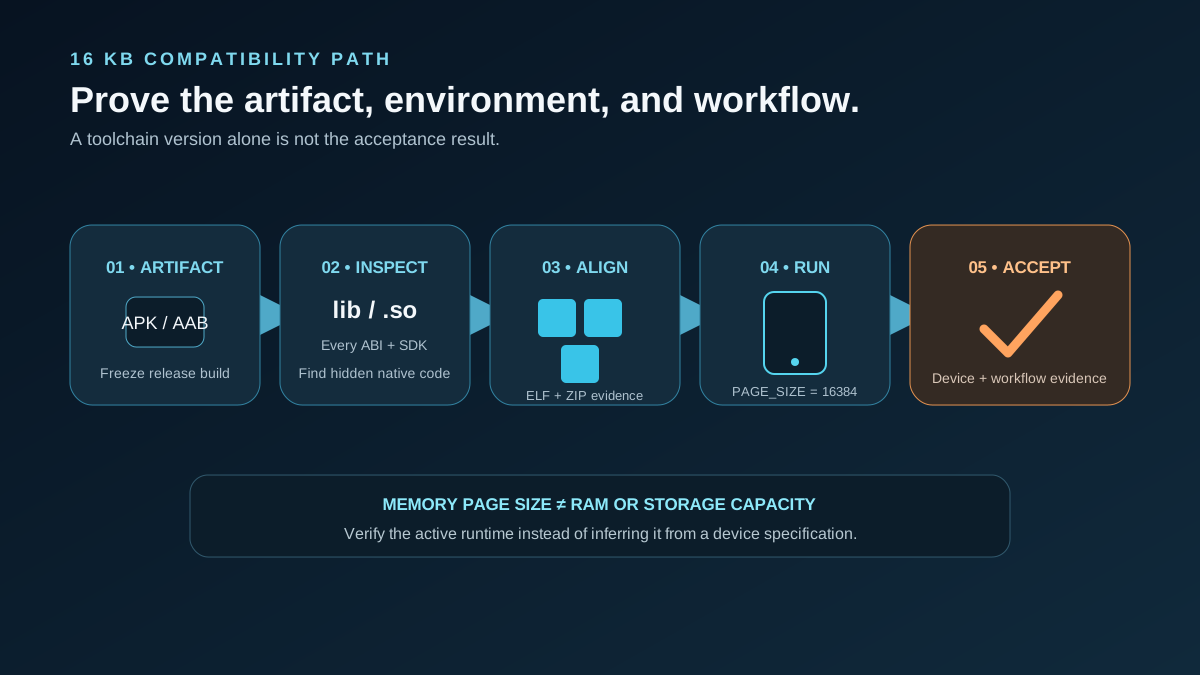
Android's 16 KB requirement concerns how the operating system maps memory, not how much RAM or storage a device has. Teams should identify every native .so dependency, produce a correctly aligned artifact, test it in an active 16 KB environment, confirm the applicable Google Play rule, and complete separate acceptance testing on representative enterprise devices.
What 16 KB page size means
A memory page is a unit used to map virtual memory. It is not installed RAM, persistent storage, app download size, or a procurement line such as “8 GB + 128 GB.” Android historically used 4 KB pages. Android 15 introduced platform support for devices configured with 16 KB pages.
A device may be capable of 16 KB operation while its current firmware is running another page size. More memory does not prove that 16 KB is active. Verify the running build rather than inferring the value from a product sheet.
What is the current Google Play requirement?
Android's current 16 KB compatibility guide says all apps targeting Android 15, API level 35, or higher must support 16 KB memory pages on 64-bit devices on Google Play. Starting February 1, 2027, app updates without 16 KB support cannot be released.
That date has a stated Google Play app-update scope. It is not a universal deadline for every direct APK, private channel, OEM preload, or already-installed fleet. Runtime compatibility still matters outside Play: a package with incompatible native binaries may not install or run correctly on an active 16 KB environment.
Identify native dependencies first
The first question is not whether the main codebase uses Kotlin. It is whether the final APK or App Bundle contains native code. Native libraries can arrive through C/C++, JNI, the NDK, third-party SDKs, cross-platform frameworks, game engines, or other prebuilt components.
Use APK Analyzer on the release APK. If the lib folder contains shared-object (.so) files, the artifact uses native code. Inspect every ABI and library, including binaries the app team did not write.
| Component | Native risk | Evidence | Next action |
| --- | --- | --- | --- |
| App C/C++ or JNI | High | Source, NDK config, APK | Rebuild, align, test |
| Third-party SDK | Medium to high | Exact version and packaged .so files | Upgrade, replace, or obtain compatible binaries |
| Framework or engine | Variable | Final APK/AAB | Inspect every bundled native library |
| JVM-only library | Low | No native files in final artifact | Test the release build |
| Unknown prebuilt | High | Vendor documentation plus inspection | Do not accept an unsupported assumption |
A truly Java/Kotlin-only artifact has no native libraries, but that conclusion must be made from the packaged build—not from the language used by the app team.
Build and verify the artifact
Android separates the work into packaging shared libraries, compiling with 16 KB ELF alignment, removing 4 KB runtime assumptions, and checking SDK support.
The documented modern path uses Android Gradle Plugin 8.5.1 or higher, NDK r28 or higher, and 16 KB-compatible prebuilt dependencies. NDK r28 and later compile with 16 KB alignment by default. Toolchain upgrades do not repair an old vendor .so; every prebuilt dependency still needs evidence.
Search native code for hard-coded 4096, PAGE_SIZE, mmap() usage, and alignment assumptions. Apply the official ELF checks, bundletool, and zipalign. Correct alignment is necessary, but it does not prove business workflows will pass.
Connect these inputs to the App-Ready Android Device Checklist and Android Device Build Specification.
Confirm an active 16 KB environment
Android documents emulator images, Cuttlefish configurations, remote testing, and supported physical-device developer options. Verify the test environment directly:
adb shell getconf PAGE_SIZE
An active 16 KB environment returns 16384. Record the command result with app version, device SKU, firmware, ABI, and test date. This separates device capability from the configuration used for acceptance.
Android also documents a backcompat mode that allows some 4 KB-aligned apps to work. Treat it as diagnostic or transitional evidence, not the preferred acceptance baseline: Android still recommends correct 16 KB alignment for reliability and stability.
Complete device acceptance
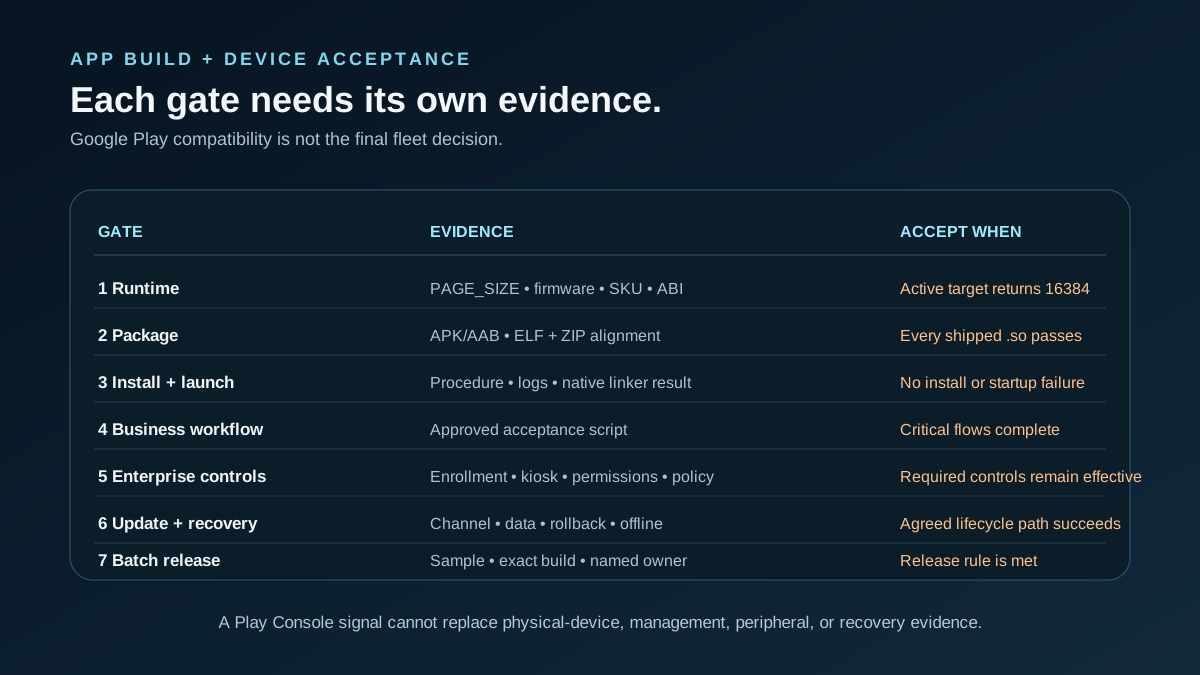
| Gate | Evidence | Pass condition |
| --- | --- | --- |
| Runtime | PAGE_SIZE, firmware, SKU, ABI | Representative target returns 16384 |
| Package | APK/AAB and ELF/ZIP alignment results | Every shipped .so passes |
| Install and launch | Procedure and logs | No install, linker, or startup failure |
| Business workflow | Approved acceptance script | Critical flows complete |
| Enterprise controls | Enrollment, permissions, kiosk/launcher, policy | Required controls remain effective |
| Update and recovery | Play, MDM, private channel, rollback/data checks | Agreed path succeeds |
| Batch | Sampling plan, exact build, named owner | Evidence meets the release rule |
This is a Vantora rollout framework, not Google Play policy. Store compliance does not validate firmware, MDM enrollment, peripherals, offline behavior, update recovery, or customer acceptance.
Use a defined Testing & Certification protocol, account for GMS versus AOSP devices, and preserve evidence during batch staging.
Enterprise rollout sequence
- Freeze the app, SDK, device, firmware, and distribution scope.
- Inspect the final artifact and inventory native dependencies.
- Rebuild or replace incompatible libraries and verify alignment.
- Test in a confirmed 16 KB environment.
- Run physical-device acceptance for workflows, enrollment, updates, and recovery.
- Stage the batch and release against agreed evidence.
For device-specific review, submit a sanitized Project Brief covering the package/build, AAB or APK, target/minimum SDK, native SDKs, candidate hardware and firmware, page-size evidence, peripherals, MDM/UEM, offline/update/recovery needs, and acceptance owner. A brief does not confirm compatibility, Play approval, certification, or acceptance.
FAQs
Is 16 KB page size the same as 16 GB of RAM?
No. Page size describes memory mapping; RAM is physical memory and storage is persistent capacity.
Does every Java or Kotlin app require rebuilding?
Not necessarily. Inspect the final artifact first. SDKs or frameworks may add native .so files even when the app team writes only JVM code.
How do we find hidden native libraries?
Analyze the release APK and inspect its lib directory, every ABI, and every prebuilt .so.
Does passing Google Play prove the fleet is ready?
No. It does not validate device firmware, MDM, peripherals, workflows, offline operation, or field updates.
Can backcompat mode be the rollout solution?
It can let some apps work, but Android recommends proper 16 KB alignment for reliability and stability.
Official sources
Unverified or conditional claims
- Whether a device SKU is actively using 16 KB pages depends on its firmware and boot configuration.
- Third-party SDK support depends on the exact binary version packaged in the release.
- Emulator success alone does not establish physical-fleet acceptance.
- Performance changes are workload- and device-dependent; this article makes no performance promise.