Batch-Staged Android Devices: What Happens Before Delivery?
Android device batch staging is the controlled work between an accepted sample and delivery: apply the released reference, verify device and project state, separate exceptions, kit released units and provide a traceable handoff.
- Published
- Updated

Batch Staging Reproduces a Released State
Batch staging is the controlled work that turns one accepted sample into a batch of units carrying the same state. It is not another enrollment method, and it does not prove that every possible workflow was tested. It is a project-control layer intended to reproduce a released state under recorded conditions and to expose deviations for a named release decision. The operative word is reproduce. By the time staging begins, the decisions have already been made and frozen — exact model and regional SKU, firmware build, app artifact and version, policy or profile revision, provisioning route, labels, accessories and packing rules. That frozen description is the build spec, and what a build spec records and how it is changed under revision control is a subject in its own right; the accepted sample is the single unit on which the spec was proven. Staging adds nothing to the specification. Its entire job is to apply the same inputs the same way to every unit in the batch, and to leave behind evidence that it did. Android’s runtime build fields, provisioning model and app version fields contribute evidence, but none of them defines a universal staging or sampling standard. “Batch staging” is Vantora project language; scope, unit coverage, evidence and authority must be agreed for the project. The table below sets the boundary of that evidence. Each control area records something real, and each one has a limit that a batch record must not overstate — most expensive rollout surprises come from treating a recorded input as a proven outcome.
| Control boundary | What staging can record | What it cannot prove alone |
|---|---|---|
| Released baseline | The build-spec and acceptance revisions used as the reference. | That the sample was accepted correctly or every field applies to this batch. |
| Unit identity | Procurement and unit identifiers reconciled with observed runtime fields. | That a runtime fingerprint proves the physical BOM, regional variant or supply source. |
| Provisioning | The validated ownership, enrollment, tenant, token or assignment route. | That every EMM exposes identical methods or recovery behavior. |
| App and policy | Exact app artifact, configuration, policy/profile revision and observed outcomes. | That an installed package or sent command proves the workflow. |
| Sampling | Population, per-unit checks, sampled workflows, selection method and stop rules. | That Android documentation sets a universal sample size or failure threshold. |
The Seven-Stage Path Before Handoff
Staging is a line, not a moment, and the ordering carries most of the control. Four rules decide whether the line produces evidence or merely produces devices. First, the provisioning route is settled in the build spec and never chosen at the bench — a QR or NFC flow, a zero-touch assignment, an EMM enrollment token and an OEM tool are not interchangeable under time pressure, and the comparison between them belongs to Android device provisioning methods, decided long before a carton is opened. Second, an operator waits for state to settle rather than declaring success when a command was sent; policy that is queued is not policy that is applied, and the gap between the two is where a batch silently diverges from its sample. Third, nothing is packed before its result is recorded, because a unit inside a sealed carton is no longer inspectable without breaking the pack — which is why identifiers are captured as units are kitted rather than reconstructed afterwards from a purchase line. Fourth, a mismatch leaves the release stream immediately and stays out until its impact and disposition are decided by someone with the authority to decide; the expensive version of this failure is a technician who fixes an anomaly quietly and ships it. A project may combine stages or omit a non-applicable one, but only through the agreed scope and acceptance authority, and the omission is recorded rather than assumed.
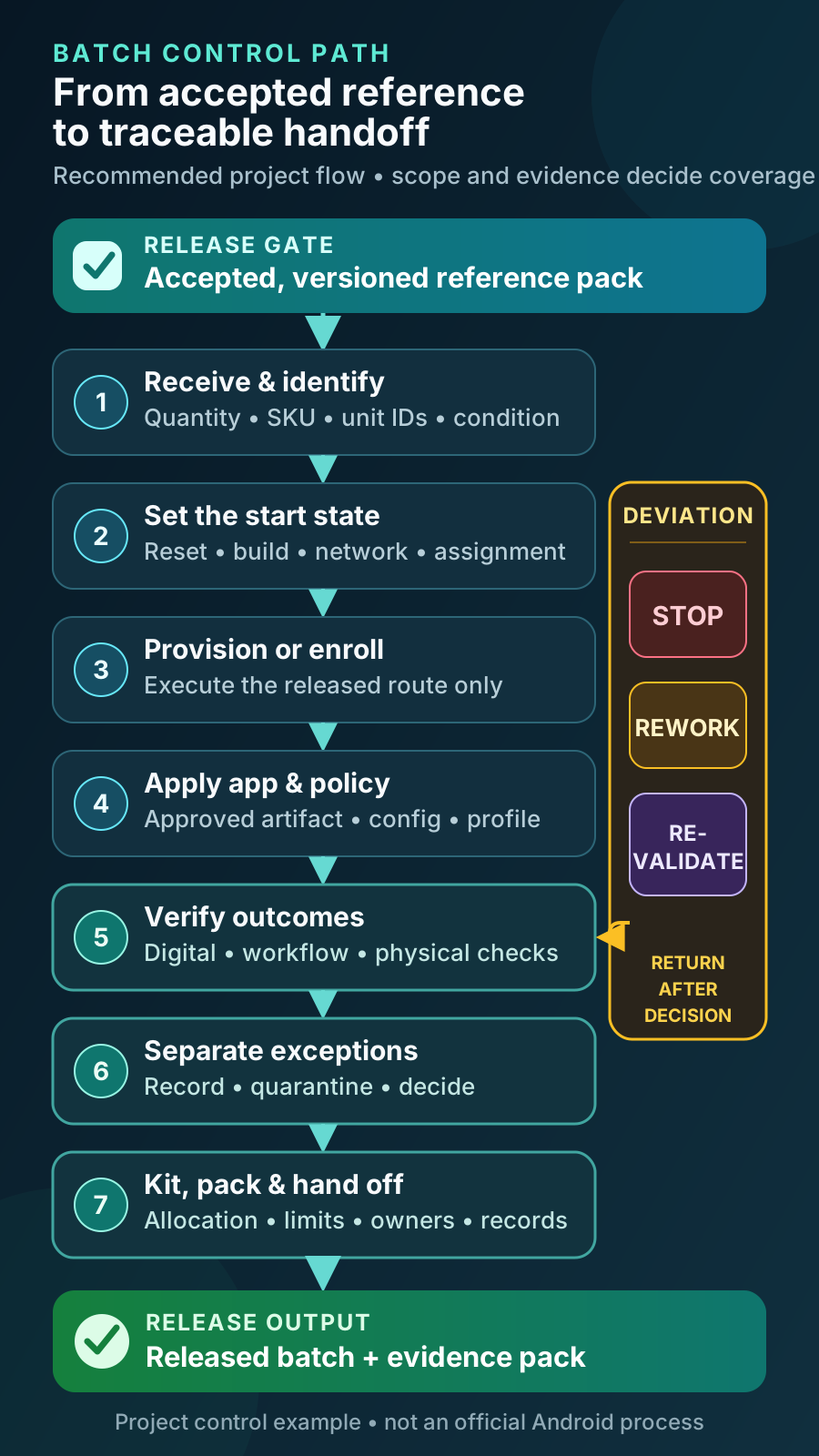
| Stage | Controlled action | Release boundary |
|---|---|---|
| 1. Receive and identify | Reconcile quantity, unit IDs, exact SKU/variant, visible hardware, accessories and carton condition. | Segregate mismatches until their impact is decided. |
| 2. Set the start state | Apply the agreed sealed/reset state, firmware, assignment, network, charge and update conditions. | Record what is observed rather than infer it from a purchase line. |
| 3. Provision | Execute the validated ownership, EMM/DPC, token or assignment and enrollment route. | Enrollment success is not complete workflow acceptance. |
| 4. Apply apps and policy | Apply the approved artifact, configuration, policy/profile revision and relevant accounts or network profile. | Capture source and versions; a sent command is not an observed result. |
| 5. Verify results | Run the agreed digital, workflow, identity, physical-kit and persistence checks. | State which checks were per unit or sampled and how units were selected. |
| 6. Segregate exceptions | Assign rework, replacement, deviation or revalidation while preserving observed state and history. | Only the named authority changes the release decision. |
| 7. Kit and hand off | Pack released units by label, accessory, site, spare, carton, activation and support rules. | Reconcile released quantity, exceptions, limitations and receiving actions. |
Evaluation Sample, Pilot Tranche, Production Batch
Staging happens more than once in a program, and the runs are not interchangeable. A program normally moves through three of them: one to three evaluation samples that prove the specified state is achievable at all on the exact model and build, a pilot tranche that proves the staging run itself is repeatable in real conditions, and the production batch that reproduces the released state at volume. Vantora quotes device programs from around 500 units upward, and the pilot is a tranche inside that program — typically twenty to one hundred units — rather than a separate small order. Reading a pilot as a trial purchase is the most common source of misalignment at quotation stage, because the two things are priced and scheduled differently. The sample answers whether the state is achievable. The pilot answers whether it is reproducible, and it answers several questions the sample structurally cannot: how long a unit really takes at each station, what proportion of units raise an exception, whether the pack plan survives contact with a real carton and a real courier, whether site staff can complete first-day activation from the printed instructions, whether the accessories fit the units as delivered, and whether the labels stay attached. It is also the first time devices reach real users, which is where requirements nobody wrote down tend to surface. A pilot has a defined end rather than a duration: an agreed staging record, an exception rate the approver accepts, a confirmed per-unit handling time and a signed-off pack plan. Findings that change a material assumption go back into the build spec as a new revision and, where they touch behavior, into a re-run of the affected sample acceptance matrix scenarios — not into an informal instruction to the staging operator. Only then does the balance of the program get staged against the same frozen revision.
| Run | Typical unit count | What it exists to answer | What it must produce before the next run |
|---|---|---|---|
| Evaluation sample | 1–3 units | Can the specified state be achieved on this exact model, regional SKU, firmware, app and policy revision? | A completed acceptance matrix with verdicts and owners, a frozen build-spec revision, and a logged list of known limitations. |
| Pilot tranche | Typically 20–100 units inside an agreed program | Does the staging line reproduce that state repeatedly, and does the result work at a real site? | A staging record for the tranche, an accepted exception rate, confirmed per-unit handling time, a signed pack plan and any spec revisions arising. |
| Production batch | The balance of a program quoted from around 500 units upward | Does every released unit carry the frozen revision, with the deviations visible? | A per-unit batch record, a reconciled exception log, released-quantity reconciliation and the handover pack. |
| Repeat order | Agreed per order against the same frozen revision | Is the incoming hardware, firmware, app and policy still the state that was accepted? | A short re-verification run on the first units, compared line by line with the previous batch record before the rest are staged. |
What Is Checked on Every Unit and What Is Sampled
Running every check on every unit is rarely the right answer, and a single spot check is never one. The normal shape of batch verification is a split: a small set of fast, unit-specific checks runs on 100% of the batch, and everything slow or behavior-derived runs on an agreed sample. The logic behind the split is straightforward once stated. A check belongs on every unit when the thing it verifies can differ from unit to unit and cannot be recovered later — an identifier that was never captured, a device that never reached device-owner state, a missing accessory inside a sealed carton. A check can be sampled when what it verifies is a property of the build rather than of the individual unit: lock-task persistence after reboot derives from the policy revision applied to the whole batch, so a failure on one unit almost always means the reference is wrong, not that one device is unlucky. A sampling ratio on its own means very little. Three things have to be stated alongside it for the record to be defensible: the population it was drawn from, how the units were selected — random, first and last of each tray, or stratified across production lots — and the stop rule that applies when a sampled unit fails. The usual stop rule widens coverage rather than continuing: a failure in the sample suspends the run, triggers a check of the reference and the applied inputs, and either escalates to 100% verification of that check or pauses staging until the cause is understood. Neither Android nor the management platforms set that ratio for you; it is a project agreement, informed by the risk of the workflow, the cost of a field failure and the pilot’s observed exception rate.
| Check | Normal coverage | Why that coverage | Where the result is confirmed |
|---|---|---|---|
| Unit identity capture (serial, IMEI, asset tag) | Every unit | The record is part of the deliverable, and an identifier not captured before packing cannot be recovered without unpacking. | One line per unit in the batch record, reconciled to the shipping list. |
| Ownership and enrollment state reached | Every unit | A single unit that did not reach the intended managed state ships as an unmanaged device into a managed fleet. | Console or tenant inventory reconciled against the batch list. |
| Approved app package and version present | Every unit | Version drift is the most common silent defect and is invisible from the outside of the device. | Observed app version compared with the frozen build-spec revision. |
| Power-on, display, touch, charging | Every unit | Physical faults are genuinely unit-specific and are cheapest to catch before the unit is kitted. | Goods-in and pre-pack check lines in the batch record. |
| Label, accessory count and carton contents | Every unit | Telemetry cannot prove what is physically inside a box. | Pack-plan sign-off, cross-checked at the packing station. |
| Full workflow run inside the application | Sampled at the agreed ratio | Handling time per unit is high and the workflow is a property of the build, not of the individual device. | Named acceptance-matrix scenarios re-run on the sampled units. |
| Peripheral pairing (scanner, printer, dock, sled) | Every unit where the peripheral ships with it; otherwise sampled | Pairing is unit-specific when the accessory is unit-specific, and build-specific when it is shared. | Batch record for paired sets; acceptance matrix and pilot result otherwise. |
| Reboot, lock-task and policy persistence | Sampled | Behavior derives from the policy revision applied across the batch. | Acceptance-matrix scenario, spot-checked per batch and after any policy change. |
| Factory-reset and recovery behavior | Sampled, small | Slow, and it returns the unit to the start of the line; the outcome depends on the provisioning route, which is common to the batch. | Acceptance matrix, plus mandatory re-verification on any reworked unit. |
| SIM, APN or cellular activation | Every unit where a SIM or profile is fitted; otherwise sampled | A fitted SIM makes the check unit-specific and ties it to a per-unit number or profile. | Batch record entry per fitted unit, reconciled with the carrier or profile list. |
Evidence That Makes the Batch Traceable
A useful handoff lets the receiving team answer three questions: Which units did we receive? Which approved state were they intended to carry? What was observed, excepted and authorized before release? Answering those questions is what separates a batch record from a packing list. In practice the record is a table with one row per unit and a small set of batch-level attachments — the released build-spec revision, the acceptance evidence, the exception log and the pack plan — because a per-unit row is the only structure that survives the questions asked six months later, when a support desk has one serial number and no context. An Android Management API device record can expose applied policy, compliance and selected software or app data under configured reporting settings, but it is not a universal EMM acceptance record, and a console export is a snapshot of current state rather than a record of what was verified at release. Pair platform reporting with observed workflow and physical evidence. The distinction matters most at the two ends of the record: a console can tell you a policy is currently applied, and it cannot tell you that a tester watched the device hold that policy through a reboot; it can list an app version, and it cannot tell you the correct accessory was in the carton.
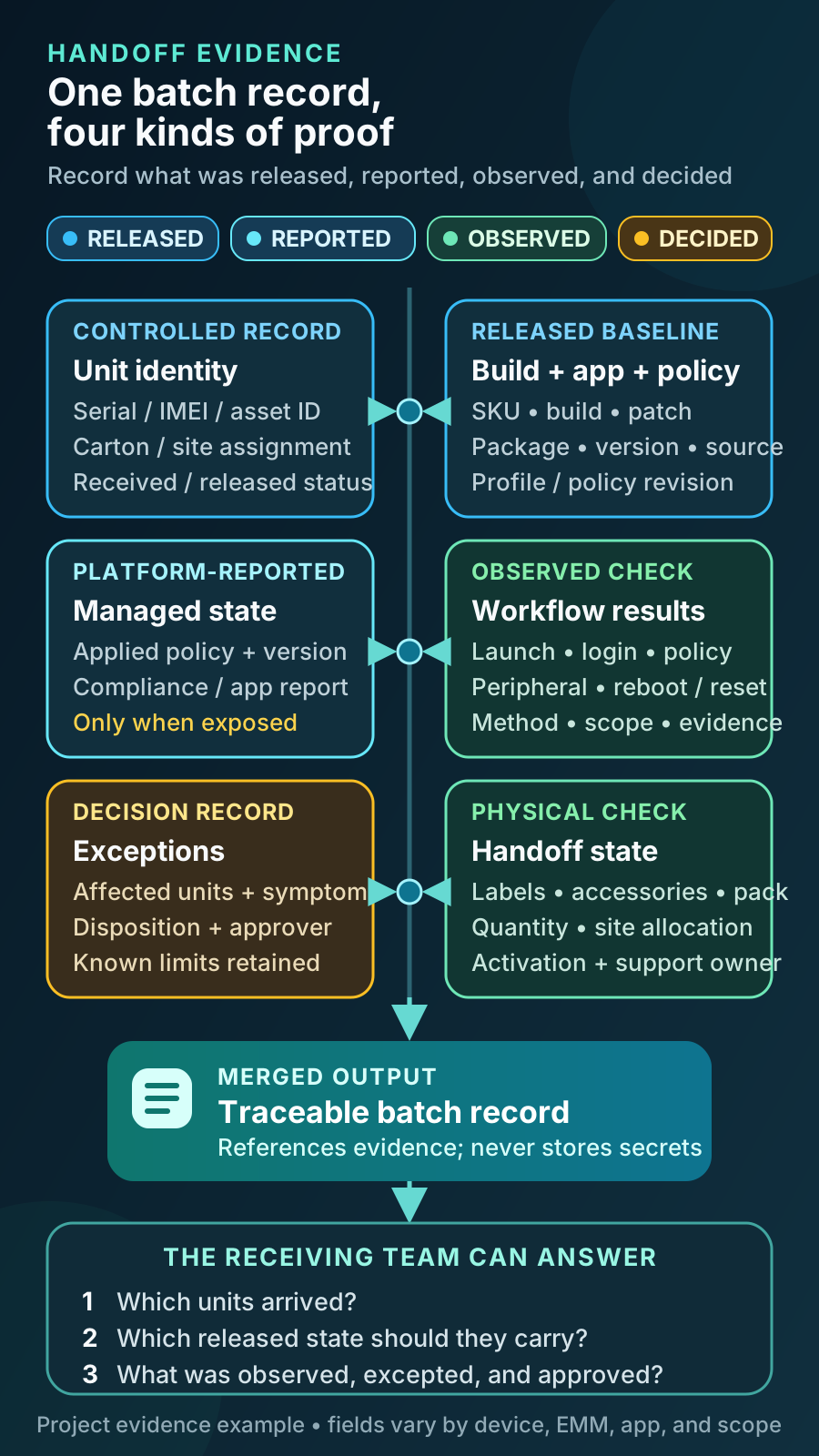
| Evidence group | Useful contents | Boundary |
|---|---|---|
| Unit identity | Serial, IMEI, asset ID, carton or site assignment. | Store identifiers in an approved controlled record. |
| Build and app state | SKU, build reference, patch, app package, version and source. | Runtime fields do not prove physical BOM or app workflow. |
| Management state | Ownership mode, enrollment route, applied policy or profile revision. | EMM status depends on product and reporting settings. |
| Check results | Required outcome, method, scope, result and evidence reference. | A sent command is not the same as an observed outcome. |
| Exceptions | Affected units, symptom, cause if known, disposition and approver. | Keep rework history and accepted limitations visible. |
| Physical handoff | Labels, accessories, packaging, quantity, allocation and activation steps. | Digital telemetry cannot prove carton contents. |
The Handover Pack and Where the Records Live
The handover pack is the set of documents that travels with the batch and stays useful after it. A record that exists only inside the integrator’s systems is not traceability for the customer; it is a promise that someone else can look something up. The pack should be handed over in a form the receiving organisation can hold on its own — normally the released build-spec revision, the acceptance evidence from the sample, the per-unit batch record, the exception log, the known-limitations log, the pack and allocation list, and the receiving instructions that name the support owner and the escalation path. Each of those has a different consumer, and that is the reason the pack is a set rather than a single report: procurement reconciles quantities, IT loads identifiers into asset management, the support desk needs to know which limitations are accepted rather than broken, and whoever runs the next order needs the frozen revision to quote against. The table below states, record by record, what it captures, who actually uses it and where it lives once the batch is delivered. One line in it deserves particular attention: after handover the tenant state belongs to the customer’s EMM administrator, so the person who holds those credentials has to be named before the batch ships rather than discovered at the first policy change. Whether Vantora retains a copy of the staging record, and for how long, is a scope question agreed in the project rather than an assumption.
| Record | What it captures | Who consumes it | Where it lives after handover |
|---|---|---|---|
| Released build-spec revision | The frozen model and regional SKU, firmware build, app artifact and version, policy revision, provisioning route, labels, accessories and packing rules. | Approver, staging operator, whoever quotes the next order. | Handover pack; the reference revision quoted on any repeat order. |
| Acceptance evidence from the sample | Scenario-by-scenario expected and observed behavior, verdicts, conditional passes and named owners. | Approver, customer IT, application owner. | Handover pack; reopened whenever a revalidation trigger fires. |
| Per-unit batch record | One row per unit: identifiers, provisioning result, observed app and policy versions, check outcomes, carton and site allocation. | Customer IT, asset management, support desk. | Customer asset system, with a retained copy held under the agreed record-keeping scope. |
| Exception log | Affected units, symptom, cause where known, disposition, rework history and the approver of each decision. | Approver, procurement, support desk. | Handover pack; reconciled against released and received quantities. |
| Known-limitations log | Accepted residual behaviors, their dependency owners and the events that require revalidation. | Customer IT, approver, the next project team. | Handover pack; reviewed before any repeat order or policy change. |
| Applied artifact set | Exact application package and version, configuration files, policy export and the signing identity reference used. | Application owner, the next staging run. | Controlled repository named in the handover pack, under the app owner’s change control. |
| Pack and allocation list | Carton contents, labels, accessory sets, spares and per-site allocation. | Receiving operations, logistics, site leads. | Delivery paperwork and the receiving system. |
| Tenant and console state | Enrolled devices, applied policy revision, reported app versions and compliance state. | The customer’s EMM administrator. | The customer’s own tenant — after handover the customer holds this record, not the integrator. |
Know When to Stop, Rework or Revalidate
Exceptions are isolated, not absorbed. A unit that fails a check leaves the line in both senses: physically, to a marked area away from released stock, and in the record, where its identifier is flagged and removed from the released quantity until a named authority dispositions it. Four dispositions cover almost everything — rework through the approved route, replacement from spare stock, release under a recorded deviation, or rejection — and each is attributed to a person, not to the process. A reworked unit re-enters at the affected stage and is verified again from that point onward, including checks it had already passed, because a corrective action can disturb state that was previously good; a unit reset to fix an enrollment failure has lost its app and policy state too. Two rules keep a batch credible. Nothing is repaired with an undocumented improvised step, however obvious the fix looks at the bench, because an undocumented step is a unit that no longer matches the reference. And the arithmetic must close before delivery is authorized: received quantity, released quantity, exceptions and replacements have to reconcile to each other. There is no universal threshold for a full retest. The project’s acceptance authority should assess impact and choose targeted verification, broader sampling, a new sample revision, a condition or rejection — and a cluster of similar failures should be read as a signal about the reference or the incoming hardware rather than as a run of unlucky units. Anything accepted rather than fixed belongs in the known-limitations library with its dependency owner and revalidation trigger, so that the next batch inherits the decision instead of rediscovering the symptom.
- Stop when the released reference is incomplete, the wrong SKU or build appears, infrastructure is unavailable or a mandatory result cannot be evaluated safely.
- Rework when a unit-specific deviation can be corrected using the approved route without changing the accepted baseline.
- Revalidate when the correction changes a material assumption such as device variant, firmware, app or signing path, policy, provisioning method, accessory, market or workflow behavior.
Why a Repeat Order Drifts, and What Holds It Still
The failure mode that catches experienced buyers is silent drift between batches. Nothing announces it: the same part number is ordered, the same quantity arrives, the cartons look identical, and the first symptom appears weeks later as a workflow that used to work and now does not on some units. The causes are ordinary supply and software behavior rather than anything exotic. An OEM can change a component — a display panel, a camera module, a memory or Wi-Fi supplier — under an unchanged commercial model name; a regional variant can rotate; the firmware loaded on the production line can move forward so that units arrive on a newer build than the one accepted; the application can have released several versions since the sample; the policy can have been edited in the console by an administrator solving an unrelated problem; a packaging or accessory vendor can substitute a part. Each of those is individually reasonable. Together they mean that “the same devices as last time” is a description of an order, not a description of a state. What holds a repeat order still is a pair of artifacts rather than a supplier promise. The first is the frozen build-spec revision, quoted explicitly on the new order so that the incoming hardware and software are checked against a written reference instead of a memory. The second is the previous batch record, which gives a line-by-line comparison baseline: the observed firmware build, app version and policy revision that were actually released last time. The first units of the new batch are then run as a short re-verification against that baseline before the rest are staged — a mini-pilot in effect, sized to the risk rather than to a percentage. Platform controls narrow the drift without removing it: where the device and management platform support them, a system update policy with freeze periods can hold firmware still during a rollout window, and controlled app update settings can hold back automatic updates, set a minimum version a device must reach, and stage a release to a subset of the fleet first. Note what that set does not include: the managed channel enforces a floor rather than an exact version, so “the batch runs version 4.2.1” is a statement about what was staged and verified, not a control the platform will hold for you afterwards. Both are OEM-, Android-version- and EMM-dependent and are confirmed on the sample rather than assumed. Hardware substitutions are not addressed by either, which is why an incoming check on the physical variant stays in the plan.
- Quote the frozen build-spec revision on the repeat order, not “same as the last batch”.
- Compare incoming firmware, app and policy versions against the previous batch record before staging the balance.
- Re-verify the small number of behaviors most sensitive to drift: the pinned workflow, peripheral pairing, permissions and reset recovery.
- Treat an unannounced component or firmware change as a revalidation trigger with a named owner, not as a variance to absorb.
Make Responsibility Explicit
Batch staging touches inputs that several organisations own, and most disputes at handoff are really disagreements about who owned an input. Vantora can coordinate device-program work across selection, app-ready configuration, management needs, provisioning, QA, staging and handoff within confirmed scope. It does not independently control the customer’s app, EMM tenant, Google or OEM services, carrier or authority decisions, or buyer acceptance. Writing the split down before the first tranche is staged is what allows an exception to be dispositioned in hours instead of becoming a week of correspondence — the staging operator can only execute released instructions, so an unclear instruction stops the line by design.
| Role | Typical authority or input |
|---|---|
| Buyer or integration partner | Requirements, acceptance authority, approved deviations, delivery and site rules. |
| App owner | Artifact, signing continuity, backend access, configuration schema, releases and support. |
| EMM/tenant owner | Tenant, policy, enrollment assets, reporting, administrator and recovery controls. |
| Device/OEM/supply owner | Exact SKU, build and supply evidence, substitutions, firmware and market documentation. |
| Staging operator | Execute released instructions, protect inputs, record results and segregate exceptions. |
| Receiving operations | Confirm receipt, allocation, activation dependencies, support and escalation path. |
Pre-Delivery Release Checklist
Authorize delivery only after the batch, exceptions and receiving actions reconcile to the released reference. The checklist below is deliberately short and deliberately final: each line is a condition that a named authority confirms rather than a task an operator ticks, and the batch does not leave staging while any of them is open.
- The exact build and staging revision are released by a named authority.
- Received units match the approved SKU, build and allowed-variance rules.
- The approved provisioning, app, configuration and policy routes were used.
- Required per-unit and sampled checks are complete with traceable evidence.
- Exceptions are segregated, dispositioned and reflected in released quantity.
- Labels, accessories, packaging and site allocation match the pack plan.
- The receiving team has the batch identity, limitations, activation steps, support owner and recovery path.
Scope the Batch Before Staging Starts
Staging is cheap to plan and expensive to improvise, so the scope conversation happens before the first unit is unboxed. Share the device type, expected quantity, target country, app status, management route, accepted sample state, required checks, labels and accessories, site allocation and handoff expectations. End-customer names and commercial information are not required for an initial feasibility review. Where staging sits in the wider sequence — brief, build spec, validated sample, acceptance matrix, staged batch, handoff — is set out in how a validated Android device rollout works, and the staging and provisioning work itself is described under Deployment & Provisioning. Bringing the pilot tranche into that first conversation is worth doing explicitly, because its size, its acceptance conditions and the point at which the balance of the program is released are commercial decisions as much as technical ones.
FAQ
Is batch staging the same as Android device provisioning?
No. Provisioning establishes the intended managed state on a device and is one stage inside staging. Batch staging is the wider controlled process covering unit identity, controlled start conditions, apps and policy, verification, exception handling, physical kitting, release authorization and handoff evidence. A batch can be fully provisioned and still not be releasable, because provisioning says nothing about labels, accessories, carton contents or whether the workflow was observed to run.
Does zero-touch enrollment remove the need for staging?
No. It can reduce manual enrollment when its prerequisites are met, but it does not verify app workflows, peripherals, labels, accessories, packaging, allocation or receiving operations.
Must every device receive a full end-to-end test?
Not necessarily. Define risk-based per-unit checks and sampled workflows before processing starts. Fast checks that are genuinely unit-specific — identity capture, ownership state reached, app version present, physical condition, carton contents — normally run on every unit, while slow or behavior-derived checks run on an agreed sample. The evidence must state what was checked, how the sampled units were selected, what the stop rule was and what was not checked.
How large should a pilot batch be?
There is no fixed rule, and the right size follows what the pilot has to prove rather than a percentage of the order. A tranche of roughly twenty to one hundred units inside an agreed program is the usual shape: large enough to run the staging line at a realistic rhythm, to produce an exception rate that means something and to reach more than one site or shift; small enough that a specification correction is still affordable. Vantora quotes device programs from around 500 units upward, so a pilot is the first tranche within that program rather than a separate small order. Much below twenty units a pilot mostly repeats what the sample already proved; much above a hundred and it starts carrying production risk before its own findings are in.
What happens if some units fail verification during staging?
They leave the release stream and stay out of it until a named authority dispositions them. The unit is physically segregated, flagged in the batch record and removed from the released quantity, then reworked through the approved route, replaced from spares, released under a recorded deviation or rejected. A reworked unit is verified again from the affected stage onward, including checks it had already passed, because the correction can disturb state that was previously good. Released quantity, exceptions, replacements and received quantity must reconcile before delivery is authorized, and a cluster of similar failures normally widens sampling or pauses the run rather than being treated as bad luck.
Can a factory-preloaded app be part of the staged batch?
Potentially, subject to device, firmware access, app signing and permissions, update route, GMS/AOSP path, MOQ and validation. Staging verifies the released app state; it should not improvise the preload method.
What happens if firmware or app changes after sample approval?
Pause the changed state, compare it with the accepted reference, identify affected tests and owners, and obtain the required revalidation or deviation decision before release. The comparison is only possible if the accepted firmware build, app version and policy revision were recorded as observed values rather than as intentions, which is one of the practical reasons the batch record exists.
How do we get the same devices again on a repeat order months later?
By quoting the frozen build-spec revision instead of “the same as last time”, and by re-verifying the points most likely to have moved. Between orders an OEM can change a component under an unchanged model name, the firmware loaded on the line can move forward, the application can have released several versions, and the policy can have been edited in the console. The previous batch record supplies the comparison baseline, and the first units of the new batch are checked against it before the balance is staged. Where the device and management platform support them, freezing system updates and holding application updates behind a minimum version narrow the drift, but the managed channel enforces a floor rather than an exact version, and neither control replaces an incoming check on the physical variant.
Tell us your workflow and rules.
We turn requirements into deployment-ready devices.