Android Device Provisioning Methods: A Rollout Selection Guide
There is no universally best provisioning method. Define the target ownership and management state first, eliminate routes the exact device and management stack cannot support, then prove the selected path can be repeated and recovered.
- Published
- Updated
Choose the Management State Before the Entry Method
Two decisions are often collapsed into one. The ownership and management state defines the control boundary after setup; the provisioning entry method is only the path into that supported state. A QR code does not itself mean “dedicated,” and zero-touch does not define the policy a device will receive. Review dedicated versus fully managed devices first; Google’s Android Enterprise device setup guidance also notes that method support varies by EMM provider.
| Decision | Question it answers | Examples |
|---|---|---|
| Ownership and management state | What relationship and control scope should the device have after setup? | Personally owned work profile, company-owned work profile, fully managed or dedicated |
| Provisioning entry method | How does this exact device enter the selected supported state? | Zero-touch, QR, token or DPC identifier, NFC, sign-in or an OEM-specific route |
Provisioning, Enrollment and Batch Staging Are Related—not Identical
Enrollment is the managed relationship between a device and its management environment. Provisioning moves the device from an agreed starting condition into its required initial state. Batch staging applies an accepted route across production units, checks results, records exceptions and prepares handoff. An enrollment token is therefore an input to some flows, not automatically a separate provisioning method.
- A personally owned work profile is normally added to an already configured device without a factory reset.
- Company-owned work-profile, fully managed and dedicated deployments are normally established during Setup Wizard on a new or factory-reset device.
- The afw#setup identifier downloads Android Device Policy during a supported Setup Wizard flow; the actual enrollment data is a separate artifact.
- Production token values, QR payloads, tenant identifiers, credentials and device lists must never appear in public content or ordinary acceptance evidence.
Compare the Main Provisioning Entry Methods
This matrix is a selection aid, not a universal support promise. Confirm the exact model, regional SKU, Android and firmware build, GMS or AOSP path, selected EMM or DPC, license, management state and network before approving any route. The current Android Management API provisioning guide documents the Google-supported paths and prerequisites.
| Entry method | Starting condition and prerequisites | Where it can fit | Important limitation |
|---|---|---|---|
| Zero-touch enrollment | Eligible reseller-registered device, assigned configuration, supporting EMM, GMS and network access during setup | Supported company-owned work-profile, fully managed or dedicated routes | Does not remove account, reseller, configuration, connectivity or exception work |
| QR provisioning | New or factory-reset supported Android 7.0+ device with QR reader and an EMM-generated payload | Fully managed or dedicated; company-owned work profile on Android 8.0+ where supported | A version threshold does not prove support on every model, EMM or target state |
| Setup Wizard token or DPC identifier | New or factory-reset supported Android 6.0+ device with internet and a supported EMM or DPC flow | Fully managed, dedicated or company-owned work profile where supported | afw#setup obtains Android Device Policy; the enrollment token remains separate |
| AMAPI sign-in URL | Supported identity flow that selects or receives the intended enrollment policy | Personally or company-owned work profile, or fully managed deployment | Not suitable for a userless dedicated device; implementation is provider-specific |
| NFC provisioning | New or factory-reset NFC-capable Android 6.0+ device and supported EMM or DPC data | Supported fully managed or dedicated deployments | Does not provide company-owned work-profile provisioning and is not a universal default |
| Personally owned work-profile flow | Existing device using a supported Settings, link or management-app flow | Adds a managed work container without resetting personal data | Does not provide fully managed or dedicated device-wide control |
| OEM- or firmware-specific route | OEM program, build access, agent or DPC, signing, update and recovery path confirmed for the exact project | Some AOSP, non-GMS or non-standard device programs | Management scope, persistence, security maintenance and recovery are project-specific |
Eliminate Unsupported Routes Before Pilot Work
Do not rank methods until the project dependencies are known. Use the following gates to remove routes that cannot reach the intended managed state on the exact device and build.
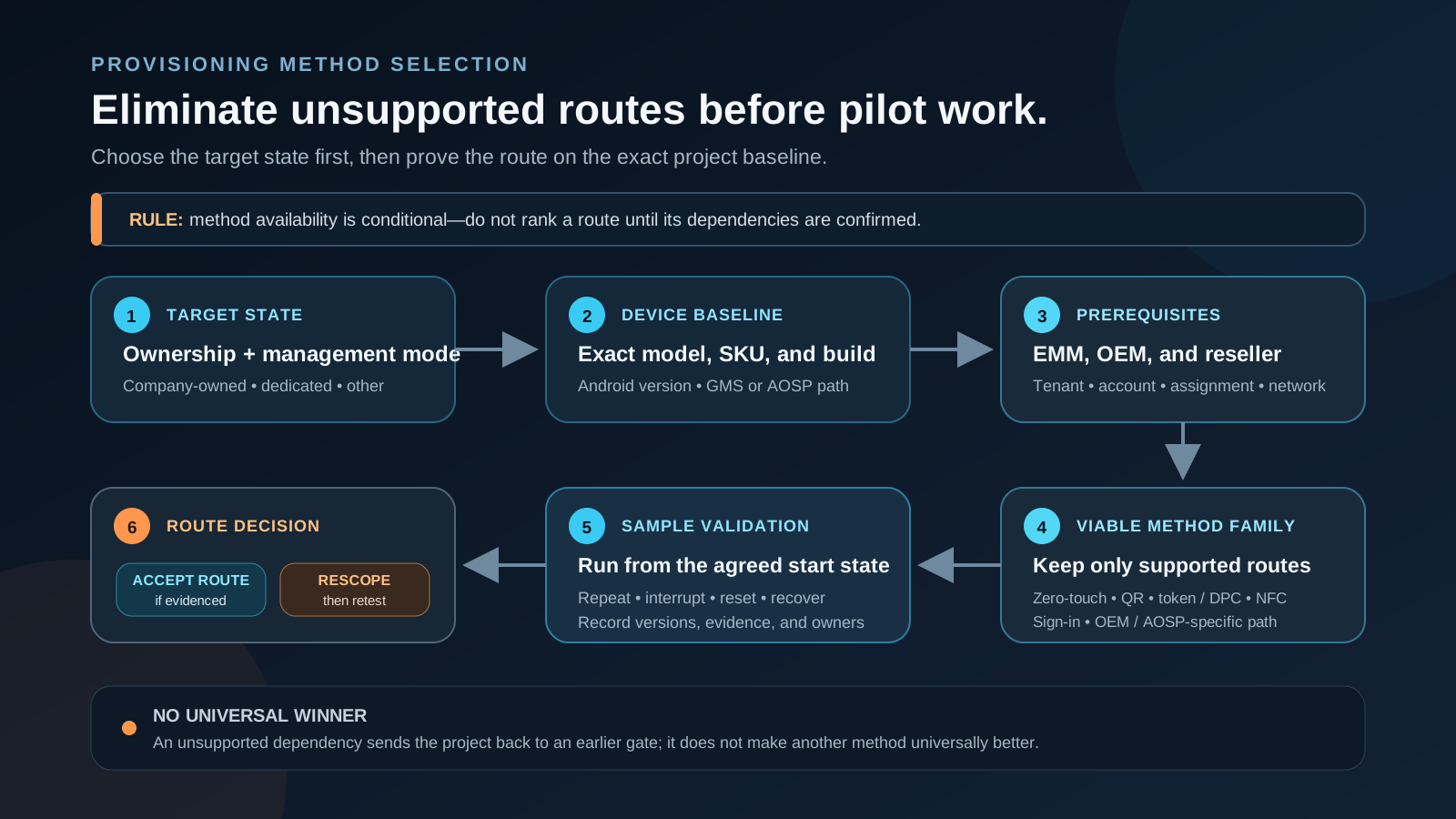
- Target state — personally owned work profile, company-owned work profile, fully managed or dedicated.
- Device baseline — exact model, regional SKU, Android version, firmware build and relevant security state.
- Google-services path — GMS, Google Play services and Android Enterprise support where the selected route requires them.
- EMM architecture — supported entry method and management state on that exact build.
- Supply chain — owners for device registration, configuration assignment, OEM program and account exceptions.
- Network — actual Wi-Fi, captive portal, proxy, firewall, DNS, time and service access.
- Recovery — agreed start state and response to interruption, reset, replacement or failed enrollment.
Validate the Route from the Intended Starting State
Documentation proves that a method exists; project acceptance requires the exact implementation to be exercised. Run the route on a version-controlled sample and record non-secret evidence for every checkpoint. Successful provisioning proves only the tested method and managed state under recorded conditions—not the complete app workflow, kiosk behavior, peripherals, regional fit, updates or batch consistency. That distinction is the core of MDM-ready versus rollout-ready.
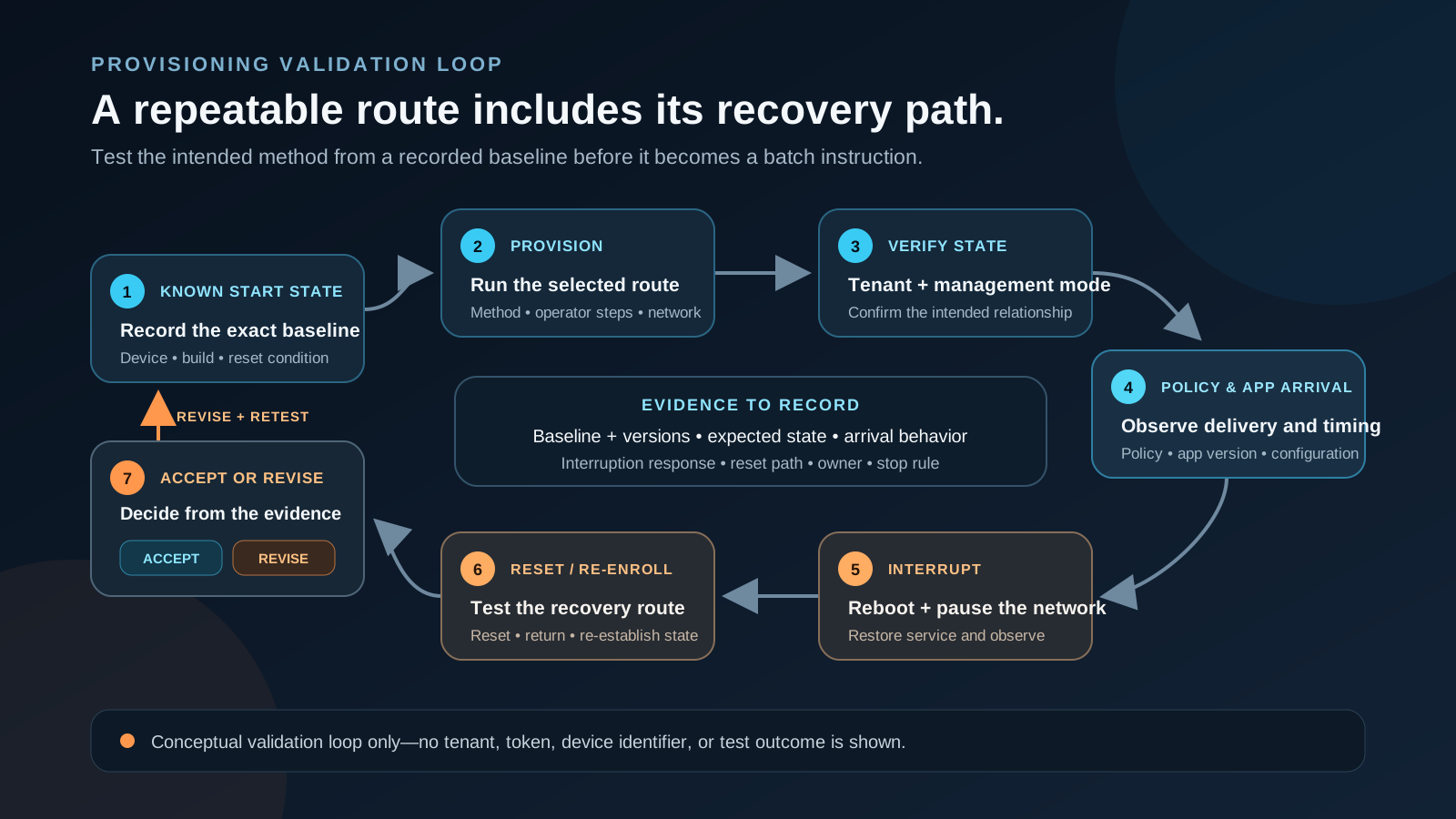
- Record the starting state and exact device and build identity.
- Execute the approved route using controlled, non-public provisioning data.
- Confirm the intended enterprise, group, ownership state and management mode.
- Verify expected policy and approved application arrival without treating arrival as proof of complete behavior.
- Test reboot, temporary network loss, interrupted setup, policy refresh and the agreed support-access path.
- Test reset and re-enrollment where required, using a scenario appropriate to the ownership state.
- Record exceptions, recovery actions, owners, results and every condition that triggers revalidation.
Turn the Accepted Route into a Controlled Batch Instruction
Once the sample route is accepted, convert it into a version-controlled instruction. Batch staging is not another Android Enterprise entry method; it is the operational process that applies the accepted route consistently, tracks devices and exceptions, performs agreed checks and prepares evidence for handoff. See Android Device Provisioning and Batch Staging for the wider delivery context.
- Record the device and firmware build, target state, method, EMM policy and approved app references.
- Use a non-secret enrollment-profile reference rather than embedding a production token or QR payload.
- Document starting condition, network prerequisites, operator checkpoints, exception path, stop rule and owner.
- Tie serial or IMEI ranges to the accepted build, policy, app, labels, accessories and carton state.
- Revalidate after changes to the build, GMS/AOSP path, EMM or DPC, policy, app, reseller process, network or recovery assumptions.
Treat AOSP and Non-GMS Programs as a Separate Feasibility Path
Do not assume that QR, zero-touch, a DPC identifier or a managed-Google route transfers unchanged to an AOSP or non-GMS build. The production route depends on the OEM build, included management components, signing and privilege model, setup experience, update ownership and staging process. Start with the GMS versus AOSP decision guide. AOSP documents the platform device-management architecture and device-owner provisioning mechanisms, but the exact project still needs its own security, recovery, lifecycle and acceptance evidence.
- An AOSP project may need an OEM-, firmware-, USB-, APK-, agent- or staging-specific workflow.
- Legacy Device Admin should not be presented as a modern shortcut; new EMM solutions should follow Android Management API rather than new Play EMM API or custom-DPC registrations.
- Custom DPC implementations must follow current Android-version provisioning handlers and be revalidated after OS or firmware changes.
Assign the Accounts and Responsibilities
The ownership model below is a planning baseline, not a universal contract. Vantora can coordinate the device program, but it does not become the customer’s EMM vendor, tenant owner, Android Enterprise operator or universal owner of every OEM enrollment program.
| Party | Responsibility to confirm |
|---|---|
| Customer or system integrator | Target management state, EMM tenant and policy authority, network access, acceptance criteria, field activation and final release decision |
| EMM provider or administrator | Supported methods and management states, DPC or agent behavior, enrollment configuration, policy assignment, reporting and escalation |
| OEM, reseller or distributor | Exact eligible model and SKU, device registration or assignment where applicable, firmware baseline and supply-chain exception handling |
| Vantora device-program team | Device and route feasibility, sample coordination, controlled instruction, validation evidence, batch preparation, QA and handoff records |
Common Failure and Recovery Cases
Most provisioning failures trace to a small set of project dependencies. Catch them on a controlled sample and rehearse the recovery route before the selected method becomes a production instruction.
- Captive portal, proxy, DNS, firewall or unstable network blocks the DPC or policy download.
- Wrong tenant, account mismatch, unassigned zero-touch configuration or reseller registration gap.
- Unsupported model, regional SKU, firmware build or management state.
- Expired token, malformed payload, DPC error or duplicate device identifier.
- Unexpected reset, factory-reset protection or incomplete re-enrollment path.
- Policy or app arrives but the representative workflow still fails after reboot, update or temporary network loss.
FAQ
Does zero-touch enrollment work on every Android device?
No. Zero-touch only works on hardware that is zero-touch eligible, and the units must be added to your customer account by an authorized reseller with a configuration assigned beforehand; eligibility is OEM- and platform-dependent and confirmed against the chosen model.
Can QR code enrollment be used offline?
Not fully — the QR carries the provisioning reference, but the device still needs a network connection during setup to download and install the device policy controller and complete enrollment, so a reachable Wi-Fi or mobile connection is a prerequisite.
Who owns the enrollment account?
For zero-touch the account is the organization’s, with devices loaded into it by a reseller; for QR or token routes the management account is held by whoever runs the MDM/EMM platform. We agree this ownership up front so it is clear before any batch is provisioned.
What is the difference between QR and zero-touch enrollment?
QR enrollment is scanned per device from a factory-reset state and needs no reseller account, which suits bench provisioning; zero-touch enrolls devices automatically out of the box but requires eligible hardware and a reseller-loaded account, which suits larger orders through a participating supply chain.
Can provisioning be completed before devices ship?
Much of it can, through warehouse staging — enrollment, app installation, validation and asset tagging happen on a bench so devices arrive closer to ready; the exact scope is configurable for MDM/EMM and tested to the agreed specification for the validated hardware.
Is afw#setup an enrollment token?
No. In a supported Android Management API Setup Wizard flow, afw#setup downloads Android Device Policy. A QR code or manually entered enrollment token is still required to provision the device into the intended enterprise and policy.
Does a dedicated device use a separate Android ownership mode?
No. A dedicated device is a fully managed device configured for a limited use case. Provisioning establishes the supported fully managed state; policy, app, launcher, kiosk and recovery validation determine whether it meets the dedicated workflow.
Can an AOSP or non-GMS device use Android Enterprise zero-touch?
Do not assume so. Standard zero-touch depends on eligible registered devices, Google Mobile Services, a supporting EMM, an assigned configuration and access to Google services. AOSP or non-GMS devices require a separate OEM, firmware, management-agent or staging feasibility review.
Tell us your workflow and rules.
We turn requirements into deployment-ready devices.