EDLA vs GMS vs AOSP: What Each Term Means for Enterprise Devices
EDLA, GMS and AOSP describe different platform, service and licensing layers. Learn what each label does not prove and what evidence an enterprise Android device needs before sample approval.
- Published
- Updated

Direct Answer
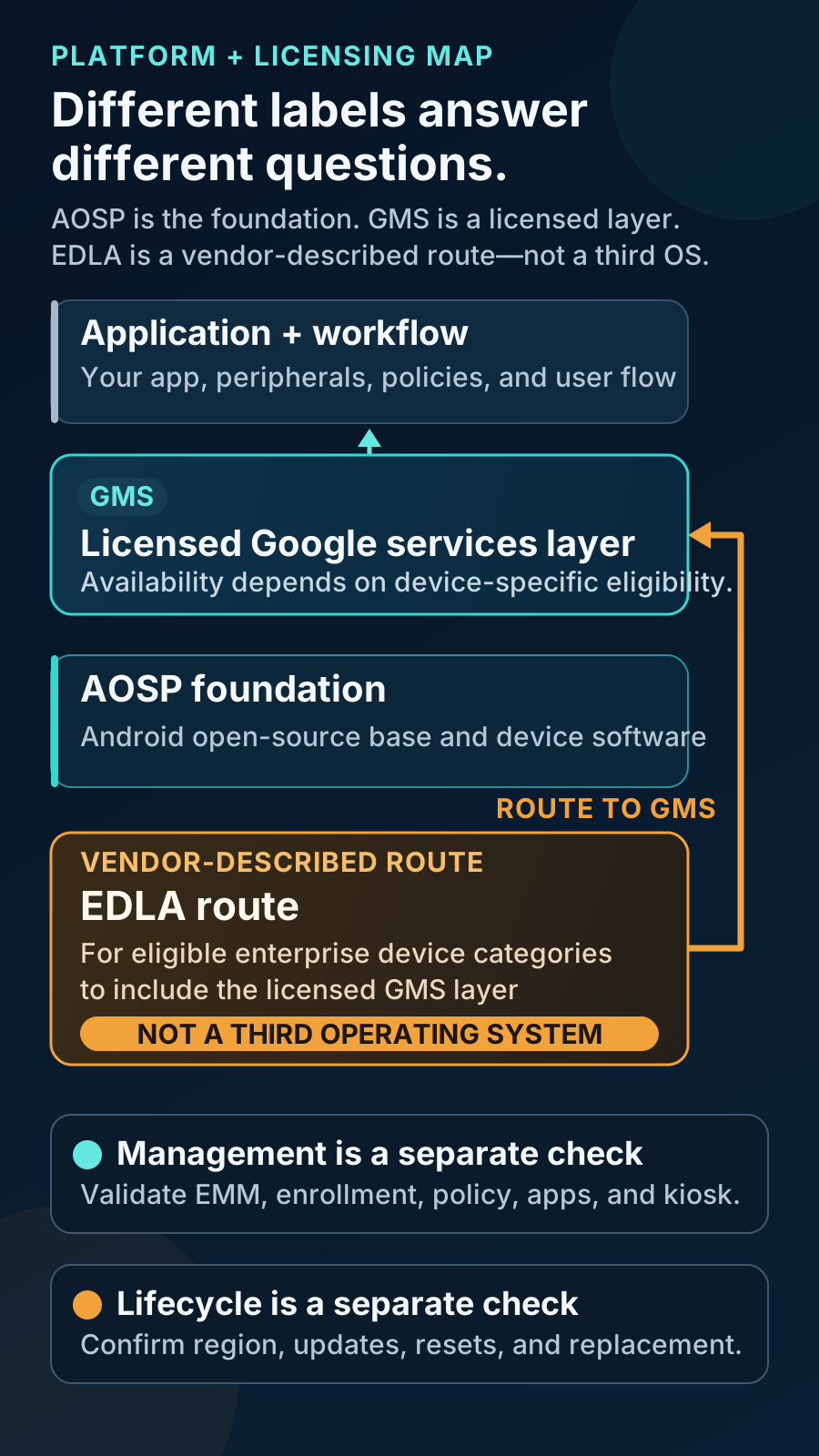
EDLA, GMS and AOSP are not three equivalent Android operating systems. AOSP is the open-source platform foundation. GMS is a separately licensed collection of Google applications and APIs added to an Android build. Public OEM and partner materials describe EDLA as a licensing route for eligible enterprise-device categories to ship that GMS layer. This review did not locate a general public Google EDLA specification covering eligibility, tests, fees and model scope; treat EDLA as a claim requiring exact-model evidence from the OEM or applicable licensing counterpart.
Start with a Layered Model, Not Three Parallel Choices
A brochure label tells a buyer which question to ask; it does not answer every project question. Treat the terms as different layers.
| Term | What it is | What it can establish | What it does not establish |
|---|---|---|---|
| AOSP | Open-source Android platform and source code. | A foundation from which a device maker can build an Android system. | Android compatibility, GMS licensing, app behavior, updates or enterprise-management support. |
| GMS | Google-licensed applications and APIs that are separate from AOSP. | Availability of the licensed Google layer on an approved device/build, subject to country and program requirements. | EDLA status, a specific EMM, zero-touch, AER status, an OS-update term or regional product approval. |
| EDLA | A vendor-described Google licensing/certification route for eligible enterprise-device categories. | An applicable path for an exact device to include GMS when supported by model-level evidence. | A third OS, universal device eligibility, Android Enterprise readiness or a complete lifecycle commitment. |
How the Layers Relate
An EDLA-marketed device is still Android-based. The decision is not “EDLA or GMS or AOSP.” Ask which Android build it uses, whether the Google layer is legitimately licensed, which route applies to the device category and whether the project requirements are validated.
What AOSP Means
The AOSP overview describes publicly available, modifiable Android source from which device makers can create variants. The Android Compatibility program separately requires the applicable Compatibility Definition Document and CTS for Android compatibility. This establishes that AOSP can be a platform basis and compatibility is an additional evidenced state. It does not establish GMS licensing, application behavior, enterprise management, updates or that an AOSP build is offline-only or private-app-only. Identify the exact build, distribution and cloud dependencies, compatibility evidence, application tests, management route and lifecycle owner instead of accepting “AOSP” as a complete architecture.
What GMS Means
Google defines Google Mobile Services as a licensed collection of Google applications and APIs that is not part of AOSP; the set can vary with country availability and requirements. Google Play services is an on-device services layer used by Google SDKs, not a synonym for all GMS. A legitimate GMS claim identifies a licensed Google software layer, but does not establish that every required Google app, SDK, account flow, managed-app channel or Play Integrity verdict works for the application and market.
- Inventory the required apps, APIs, accounts, distribution channel, background services, offline behavior and integrity calls; test them on the quoted build.
- Do not carry an obsolete integrity requirement into a new brief: Google states that SafetyNet Attestation was fully turned down in January 2025.
- Record and test the production application’s Play Integrity implementation rather than inferring it from the device label.
What EDLA Means—and What the Public Evidence Does Not Say
BenQ’s EDLA explainer describes EDLA as enabling built-in GMS on enterprise solutions such as smart boards, and Kuori’s partner page describes an EDLA partnership for GMS-compatible commercial displays. Google’s public Android Enterprise partner page directs some device-program requirements to partner materials or business contacts rather than publishing a general EDLA specification. These vendor and partner sources establish documented market use around licensed Google services on eligible enterprise-device categories. They do not establish Google’s private contract terms, universal eligibility, another supplier’s status or the status of every kiosk, display, terminal, phone or tablet.
- Treat BenQ and Kuori as vendor/partner descriptions, not Google program terms.
- Require a statement naming the exact model, SKU, Android version, build, market, claim owner and applicable evidence.
- Do not accept a brochure phrase or visible Play Store icon as sufficient evidence.
When EDLA Is Relevant
Public EDLA examples reviewed here concentrate on interactive and commercial displays. That supports asking about EDLA when a supplier invokes it for an enterprise-device category outside the familiar phone or tablet path; it does not establish a complete eligible-device list. For a conventional phone, tablet or handheld, ask whether the exact shipping build is legitimately GMS licensed and Play Protect certified. That check proves one observed certification state, not EMM behavior, update duration, regional approval or the field workflow. Record the result against the model/SKU/build, then use the GMS vs AOSP rollout decision guide for application, management, provisioning and lifecycle fit.
Apply Five Gates Before a Quote or Sample Decision
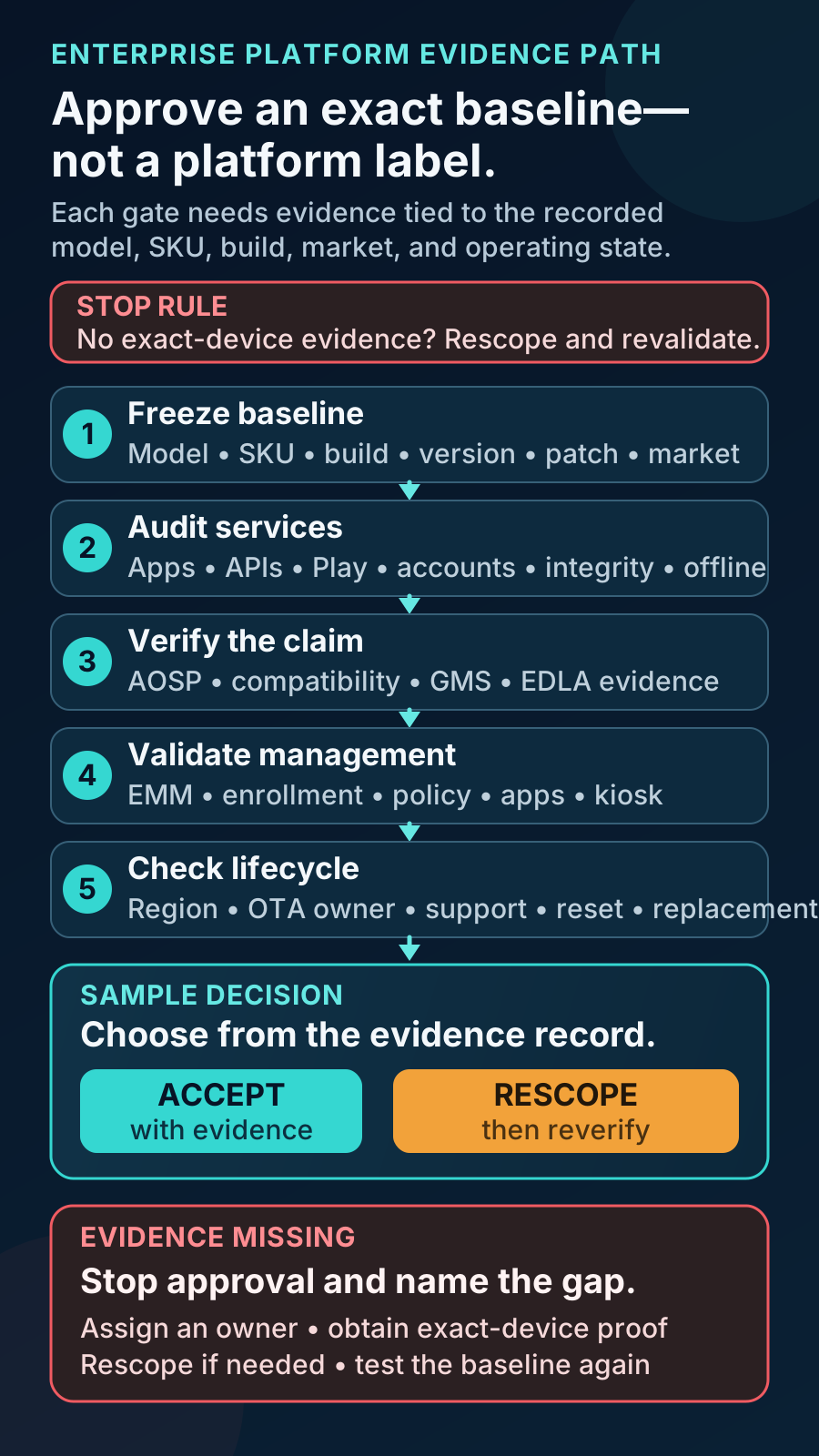
Use these gates for an EDLA-marketed display, a conventional GMS handheld or an AOSP-based industry terminal. Each gate produces a record that can be tested or challenged before the project becomes a purchase commitment.
- 1Freeze the device baseline: record form factor, manufacturer, exact model and regional SKU, Android version, firmware/build number, security patch level and any modular compute unit.
- 2Audit application and service dependencies: list every required Google application, SDK, account flow, distribution channel, background service and offline behavior; test the real application.
- 3Verify applicable licensing evidence: name the claim owner and the exact model/build/market it covers; separate AOSP source use, Android compatibility, Play Protect certification, GMS licensing and vendor-described EDLA status.
- 4Validate management and enrollment separately: name the ownership mode, EMM, DPC or agent, app channel, kiosk requirement, provisioning route, account model and recovery procedure.
- 5Confirm region and lifecycle: record country availability, update owner, OS and security-support statement, OTA route, reset behavior, replacement path, known limitations and revalidation triggers.
Keep Android Enterprise, EMM, Zero-Touch and AER Separate
Google’s Android Enterprise overview describes an EMM console, an on-device policy component and managed Google Play. The AOSP device-management overview documents device owner, profile owner, DPC and policy-framework concepts. Android Enterprise Recommended requirements are a separate, versioned program signal. Licensing, management architecture, provisioning and AER are therefore distinct evidence layers.
| Evidence layer | What to validate on the exact device/build |
|---|---|
| Android Enterprise and EMM | Intended ownership mode, EMM/DPC, enrollment, policy, managed-app channel, reporting and support access. |
| Zero-touch | Eligible model, authorized reseller account, configuration assignment, supporting EMM, clean setup connectivity and recovery. |
| Android Enterprise Recommended | Whether the listing applies to the exact SKU/build and still fits the intended market and lifecycle; it does not prove EDLA. |
| AOSP management route | Build, Setup Wizard, DPC or agent, app distribution, privileges, reset and ongoing support path. |
Accept Evidence, Not Labels
Before approving a sample, collect non-confidential evidence that can follow the device into production. The sample should prove the required workflow, not every capability suggested by a label.
| Evidence | What to record or test |
|---|---|
| Device identity | Manufacturer, model, regional SKU, Android version, firmware/build and security patch level. |
| Platform and license claim | OEM or applicable counterpart statement naming the exact device/build/market; Play Protect status where relevant. |
| Service behavior | Required Google apps and APIs, sign-in, app installation/update, account removal, offline behavior and country availability. |
| Management behavior | Intended EMM, ownership mode, enrollment, policy, app delivery, kiosk or launcher behavior, reporting and support access. |
| Lifecycle and recovery | OTA owner, update commitment, reboot, factory reset, re-enrollment, rollback or replacement route and end-of-support decision. |
| Acceptance record | Sample release note, pass/fail/conditional results, known limitations, owner, stop rule and revalidation triggers. |
Assign the Responsibilities
This is a planning model, not a universal contract. Vantora can coordinate a platform feasibility review and help turn claims into testable requirements. It does not grant Google licenses, certify EDLA devices, operate a customer’s EMM tenant or promise a licensing path on every model.
| Party | Responsibility to confirm |
|---|---|
| OEM or applicable licensing counterpart | Exact model/build claim, licensed software scope, firmware baseline, market applicability and update position. |
| EMM provider or administrator | Supported management mode, enrollment, policy, app distribution, reporting and escalation path. |
| App/SaaS or customer team | Required APIs, accounts, app versions, workflow, data handling, acceptance criteria and release decision. |
| Vantora device-program team | Requirements mapping, candidate-device review, sample coordination, evidence capture, known-limitations record and batch-baseline handoff. |
Request a Platform Feasibility Review
Share a redacted brief with the device category, candidate model/SKU, target countries, quantity range, Android build, application dependencies, required Google services, management stack, update expectations and acceptance priorities. End-customer names and private license material are not needed for an initial review. The Android device provisioning methods guide can help define the next management and enrollment decision.
FAQ
Is EDLA an alternative to GMS?
No. Public OEM and partner materials describe EDLA as an applicable route for eligible enterprise-device categories to include GMS. GMS is the licensed Google software layer; EDLA is not another operating system.
Does EDLA status guarantee Android Enterprise or EMM support?
No. Verify the exact management mode, EMM/DPC, enrollment method, managed app channel, policy behavior and recovery route on the exact device and build.
Can an AOSP device still be Android-compatible?
Yes, if its implementation meets the applicable Android Compatibility Definition Document and passes the required compatibility tests. Using AOSP source alone does not prove that status, and compatibility does not itself grant GMS licensing.
Can GMS or EDLA be added after the device is purchased?
Do not treat either as an end-user toggle or sideloading exercise. Any legitimate route depends on the OEM, exact device and build, applicable Google licensing relationship, compatibility work, market and program requirements. Review feasibility before committing the hardware.
Tell us your workflow and rules.
We turn requirements into deployment-ready devices.