Custom vs Off-the-Shelf Android Devices: A Three-Path Decision Guide
Compare a standard existing model, a configured existing model and deeper custom work. Choose the shallowest path that meets every mandatory requirement and can be sourced, versioned, recovered and reproduced for the accepted scope.
- Published
- Updated

This Is a Three-Path Decision, Not a Binary Choice
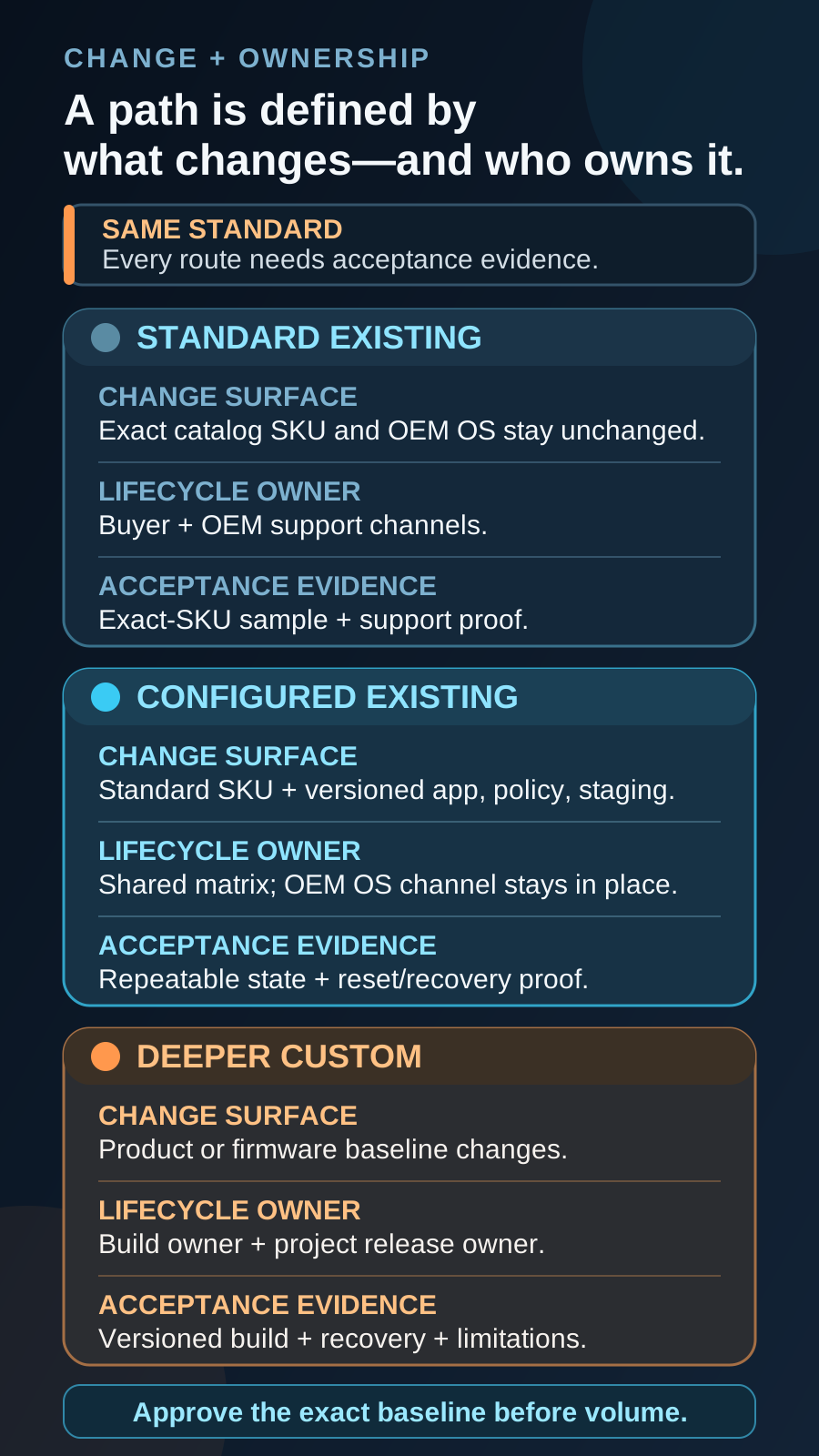
“Off-the-shelf” describes a product baseline, not its quality or management capability. A standard existing model keeps the catalog product unchanged. A configured existing model keeps the standard hardware and OEM-supported operating system, then applies a versioned project state. Deeper custom work changes the product or firmware baseline and adds build, signing, compatibility, update and maintenance ownership. These are Vantora working categories for procurement and delivery decisions, not Android management modes or Google certification labels. Two separate questions are commonly merged into one. The first is build depth: how much of the device state the program changes. The second is sourcing identity: whose brand the device carries and who controls the firmware branch behind it. They are independent. A mainstream branded model can carry a deeply configured project state and still be a catalog product, and a white-label base can ship close to stock while moving lifecycle ownership onto the program. Settle depth first, because it follows the requirement gap, then settle sourcing, because that follows brand, market and lifecycle ownership. Recording both answers in the same brief prevents a branding preference from quietly buying a firmware program that nobody scoped. The build-depth vocabulary used here — the levels, the outcomes and the evidence each one owes — is defined in what is a custom Android device.
| Decision dimension | Standard existing model | Configured existing model | Deeper custom |
|---|---|---|---|
| What changes | Nothing in the catalog product baseline. | Project state on standard hardware and OEM software. | Hardware, privileged integration, system image or product baseline. |
| Strong fit | The exact SKU already meets the workflow and can be deployed normally. | The hardware fits, but every unit must arrive in a repeatable app, policy, branding or kit state. | A mandatory requirement remains after supported device, app, management, launcher and OEM options are tested. |
| Primary evidence | Exact-SKU fit, support, supply and sample results. | Versioned configuration, reset and recovery results, and repeatable staging. | Authorized feasibility, versioned build, compatibility, update, recovery and support evidence. |
| Stop condition | Variant or lifecycle evidence is missing. | The required state cannot be reproduced after reset or change. | There is no viable build access, release owner, update path or commercial support. |
Choose the Shallowest Viable Path
A familiar catalog model can support company-owned fully managed or dedicated deployment without project-specific firmware, but the exact SKU, channel, build, app, policy, market and lifecycle still need validation. A configured route is appropriate when supported app, policy, OEM profile, launcher, branding, labels, accessories or staging can create the required repeatable state. Managed configurations only expose settings implemented by the app, and OEM tools remain model- and license-specific. Open deeper-custom feasibility only when a documented mandatory gap remains after those supported routes have been tested. Where the open question is which control layer should deliver a restriction rather than which device to buy, settle it in custom launcher vs kiosk mode vs MDM before touching the hardware decision — the answer often removes the reason to escalate at all. When a specific catalog handset is already the candidate, mainstream Android phone as a controlled project device sets out the exact-device protocol used to accept, conditionally accept or reject it.
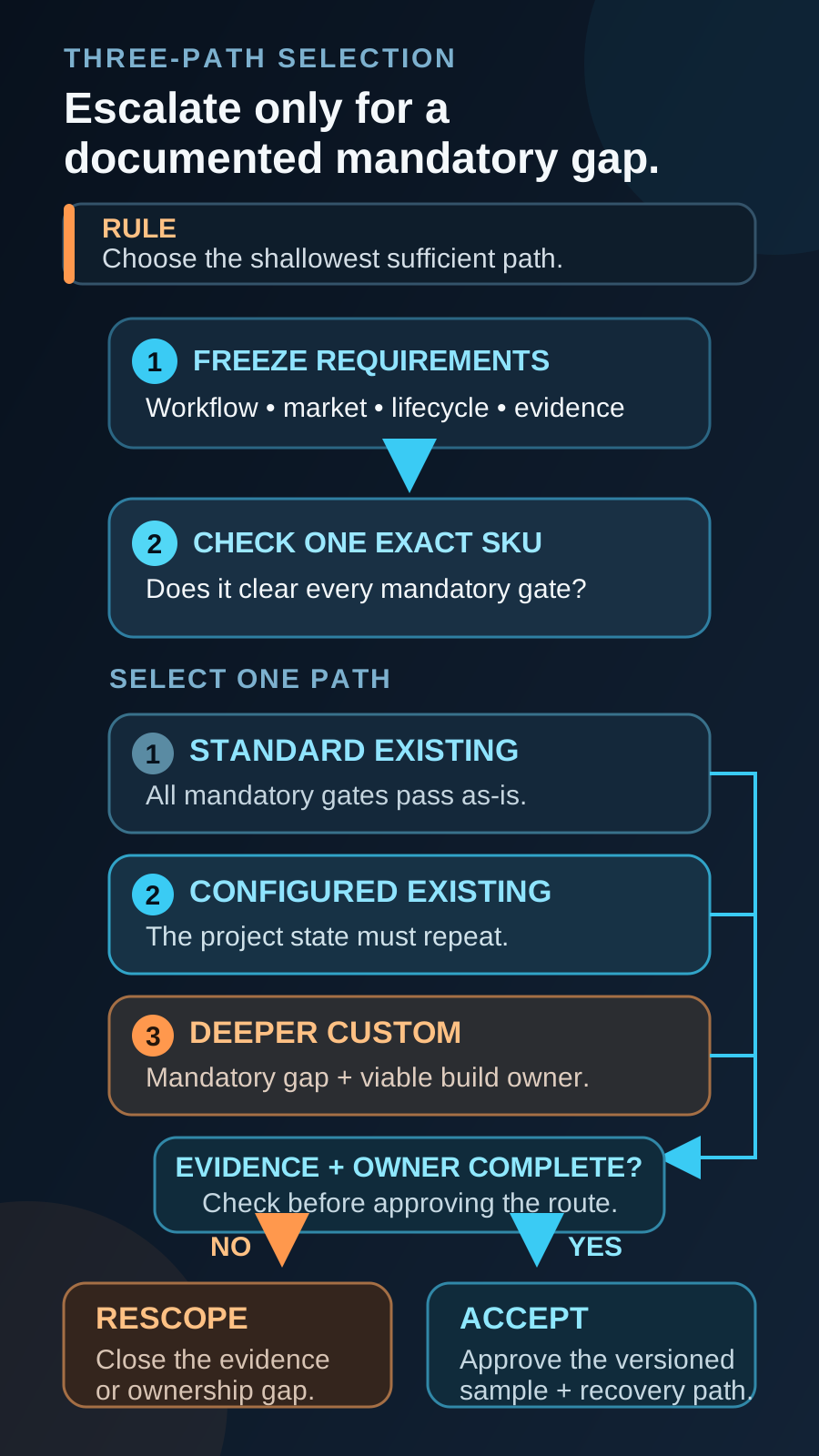
- Standard existing model: record the regional SKU, supplier, channel, Android and firmware build, platform path, bands, peripherals, support, repair route and spares.
- Configured existing model: version the device build, app, EMM policy, managed values, OEM profile or launcher, accessories and reset behavior.
- Deeper custom: name who controls source and build access, release keys, OTA delivery, rollback, security maintenance, regression, variants and end of support.
Mainstream Branded Model or White-Label Base
Build depth answers how much changes. Sourcing answers whose product it is, and the two decisions are priced and owned separately. A mainstream branded model is bought as a finished product: the OEM brand stays on the housing, the boot sequence and the system information screen, the published support and security-update window belongs to the OEM, and regional or carrier variants of the same marketing name can differ in bands, memory, firmware channel and preloaded software. Firmware access is normally limited to what the OEM exposes under agreement, so the program works through app, policy, managed configuration, OEM profile, accessory and packaging routes. A white-label or ODM-base model starts from an existing platform that the manufacturer allows another company to sell under its own name. The program brand can appear on the housing, the boot animation, the device name strings and the packaging, and an authorized build owner usually has more latitude inside the system image. The entry cost is higher — tooling, artwork, model registration, engineering time and a larger commitment — and the lifecycle moves with it. Google publishes Android Security Bulletins on a monthly cadence, but a bulletin is an upstream input: someone still has to merge, build, test and ship each patch for the exact model, and the practical window is bounded by the chipset vendor’s support for that platform. On a branded model that obligation usually sits with the OEM and is published; on a white-label base it follows the build owner’s branch and should be written into the contract rather than assumed. Branding also carries regulatory weight. In several markets, including the EU, placing your own name or trademark on a product can make the brand owner the responsible manufacturer, which is worth confirming with qualified advice for each target market before tooling or artwork is ordered. Choose the branded route when the workflow needs a known model with a published lifecycle, when the fleet is mixed or replaced region by region, and when brand visibility on the housing is not a requirement. Choose a white-label base when the device is part of your own product or service, when the brand must be visible to the end user, and when the program can carry the tooling cost, the higher quantity band and the update ownership that comes with it. White-label Android phone programs describe what that delivery scope contains, and white-label cell phones in China covers supplier, brand-rights, TAC and IMEI, approval and sample verification before anything is committed. Quantity and setup terms differ by route and are kept in MOQ, cost and timeline rather than repeated here; Vantora quotes programs from around 500 units upward on either route, and a white-label base typically sits higher in that band than a configured branded model. Where the requirement genuinely needs the deeper route, it runs as a purpose-built Android device program.
| Sourcing dimension | Mainstream branded model | White-label / ODM-base model | What the sample must prove |
|---|---|---|---|
| Brand on the device | OEM brand on the housing, boot sequence and system screens; project branding limited to wallpaper, labels, packaging and supported boot assets. | Program brand on the housing where tooling allows, plus boot animation, device name strings and packaging. | The branded sample is inspected against approved artwork: which brand appears at boot, in system screens, on regulatory labels and on the packaging. |
| Firmware latitude | Bounded by what the OEM exposes under agreement — app, policy, managed configuration, OEM profile and accessories. | Wider: an authorized build owner can preload system apps, change defaults and sign a project image. | Which behavior comes from the image and which from policy, and whether each survives the agreed reset scenario. |
| Security updates | Published OEM support window and patch cadence for the model as sold. | Patch delivery follows the build owner’s branch and the chipset vendor’s support window, so it must be contracted. | The patch level recorded on the sample, plus a named owner and a stated cadence for the next patch. |
| Variant risk | Regional and carrier variants of one marketing name can differ in bands, memory, firmware channel and preloads. | Fewer marketing variants, but production runs can change components or build between batches. | Exact SKU and build fingerprint recorded, plus the rule that applies when a component or build changes. |
| Google services status | GMS status is held by the OEM for the model as sold and is confirmed per SKU. | GMS status follows the manufacturer’s certification for the base model; a new brand or model identity may require re-declaration with Google. | The Google services state observed on the sample and written confirmation of which certified model the build belongs to. |
| Entry cost and quantity | Purchase on the OEM’s commercial terms; program cost sits in configuration, validation and staging. | Adds tooling, artwork, model registration and engineering time, amortized over a larger batch. | Quantity band, tooling or NRE terms and reorder pricing agreed before sample approval. |
| Regulatory responsibility | Approvals normally exist for the model as sold; the exact SKU and target market still need checking. | Placing your own brand can move manufacturer obligations onto the brand owner in some markets. | Which certificate covers the exact build and brand, and who is named as the responsible party per market. |
| Support and spares | OEM or regional service network where one exists for the target market. | Warranty, spares and RMA route defined contractually with the supplier. | Written warranty terms, spares ratio and RMA route included in the handoff pack. |
| End of support | The OEM announces the successor and end of life; the program reacts and revalidates. | The program owns end of life, last-time-buy and successor migration. | A named owner for successor selection and the revalidation trigger recorded with the accepted baseline. |
Apply Six Gates Before Choosing the Path
Quantity affects commercial feasibility, but it is not a universal decision threshold. A large order does not make unnecessary engineering wise, and within the band custom programs actually occupy — quotes start from around 500 units — a smaller specialized program is not automatically disqualified. The requirement gap and ownership model come first; below that band, an off-the-shelf device with an MDM subscription is usually the better-value answer. The sourcing axis crosses these gates rather than replacing one of them. Choosing a white-label base does not change what the platform, market, supply and feasibility gates ask — it changes who is able to answer them, and how long each answer takes to obtain. Run the gates against the exact candidate, then write the responsible party next to every answer, because an unowned answer is the one that fails after the order is placed.
- 1Workflow fit: test the real task, including camera, scanner, NFC, battery, dock, controls and operating environment.
- 2Platform and control fit: confirm the build, GMS/AOSP dependencies, app distribution, management mode, EMM, OEM controls and recovery.
- 3Market fit: check regional SKU, bands, language, charger, accessories, labels, certification path and acceptance requirements.
- 4Supply and lifecycle fit: identify the channel, orderable SKU, substitutions, update cadence, repair, spares and successor.
- 5Batch repeatability: repeat provisioning or staging, then interrupt, reboot, reset, re-enroll and restore the accepted state.
- 6Deep-custom feasibility: verify OEM/ODM authority, build access, engineering conditions, compatibility, signing, OTA, regression and long-term support.
Compare Lifecycle Inputs, Not a Generic TCO Winner
There is no universal cost, lead-time, downtime or lifecycle winner. A standard route includes procurement, EMM and app operations, internal staging, variant drift, update validation, repair and replacements. A configured route adds integration, licenses, samples, version control and change revalidation. Deeper custom adds engineering, tooling or NRE, OEM/ODM support, Android compatibility, controlled release signing, market work, OTA, regression, security maintenance and end-of-life transition. Model the live project with current quotes, named owners and visible assumptions. Ownership is also a counterparty question. A trading company, an authorized reseller, an OEM and an ODM can all quote a similar-looking device while holding very different rights over the build, the brand and the update path; Android ODM vs OEM separates those roles. Before comparing figures, confirm which counterparty can actually commit to a firmware change, a security patch, a spare-part flow or an end-of-life notice, and record that name beside each cost line. A lower quote from a party that cannot commit to the lifecycle is not a cheaper program — it moves the cost to the operations budget, where it is harder to see and harder to plan for.
Evidence Required Before Volume
Approve a versioned baseline, not a path label. The record must identify the exact device and software state, the tested workflow, recovery route, accepted limitations, revalidation triggers and the owners who can reproduce the accepted sample in production and later reorders. The evidence set differs by path in depth rather than in kind. A standard route can often be captured in a device build spec plus a short acceptance run against the real workflow. A configured route needs every versioned element in that same document, because the state — not the hardware — is what production must reproduce. A deeper custom or white-label route adds the image identity, signing arrangement, OTA route and patch commitment to the record, since those determine whether a later unit is still the accepted product. Whichever path is chosen, the results belong in one acceptance matrix with pass, fail and conditional entries, so an approver can see at a glance what was proven, what was accepted with a stated limitation and what remains another party’s obligation.
- Record model, regional SKU, Android version, firmware build, patch level, app version, EMM, policy, configuration and accessories.
- Test mandatory workflows under the normal, offline, reboot, low-battery, peripheral and recovery conditions that matter.
- Prove that a clean or factory-reset device can return to the accepted state through the documented route.
- Define what happens after an app, policy, OTA, firmware, model or regional-SKU change.
- Record accepted limitations, stop rules and the evidence needed to reproduce the reference sample.
How the Chosen Path Changes Batch Staging
The path decision does not end at sample acceptance; it determines what staging must reproduce on every unit and what the batch record has to contain. On a standard route, staging is largely identity and logistics: the correct regional SKU is received, units are prepared or enrolled, serials and IMEIs are recorded, labels and accessories are matched to the packing list, and a defined share of the batch is checked against the accepted reference. On a configured route, staging must reproduce a versioned state rather than a device — the app version, policy revision, managed values, launcher or OEM profile and accessory kit that were accepted are applied in the same order and confirmed per unit or per agreed sampling rule, with a stop rule when a unit deviates. On a deeper custom or white-label route, staging also gates on the build itself: the flashed image or firmware build fingerprint, brand assets, signing state and patch level are verified before a unit enters the configured steps, because a unit carrying the right software on the wrong image is not the accepted product. Reorders are where the difference becomes expensive. A standard route can usually absorb a quiet component or firmware change with a short recheck; a configured route needs the accepted state reapplied and retested; a deeper custom route may need the image rebuilt, re-signed and re-accepted before the line runs at all. Batch-staged Android devices before delivery sets out the staging record itself, and how a validated rollout works places it between sample acceptance and handoff. A pilot tranche of twenty to a hundred units inside a larger program is often the cheapest way to test the staging design, the labels and the handoff paperwork before the full batch is committed.
Assign Responsibility by Deliverable
The customer or partner owns requirements and acceptance. The app team owns application behavior, packages, signatures and exposed configuration. The EMM side owns the tenant, license, enrollment and policy operations. The OEM/ODM or authorized build owner controls hardware and firmware commitments. Vantora can coordinate selection, configuration, validation, staging and handoff, subject to project feasibility. On a white-label or ODM-base route the same table still applies, but two rows change hands: the build owner becomes the party that signs and ships the system image, and the brand owner inherits obligations that a catalog purchase would have left with the OEM — market approvals, support presentation and end-of-life communication among them. Name both parties in writing before tooling or artwork is committed, because reassigning them afterwards usually means a new sample.
| Owner | Decision or evidence |
|---|---|
| Customer or partner | Requirements, priorities, limitations and acceptance authority. |
| App team | Package, signing, configuration schema, releases and workflow behavior. |
| EMM owner | Tenant, license, enrollment route, policy revision and recovery operations. |
| OEM/ODM or build owner | Hardware, firmware, build access, updates and lifecycle commitments. |
| Vantora | Scoped coordination of device selection, configuration, validation, staging and handoff. |
Request a Fit Assessment
Share a redacted workflow, target markets, expected quantity, app and EMM state, mandatory hardware or control requirements, lifecycle expectations and acceptance priorities. An end-customer name is not required for the initial comparison. State the requirement rather than the solution you have in mind — a brief that says “the operator must not be able to leave the app between shifts” produces a shorter and more accurate comparison than one that says “we need custom firmware”. If the brand on the housing matters, say so in the first message: it changes the sourcing route, the quantity band and the lifecycle owner, and it is expensive to introduce after a sample has already been accepted.
FAQ
Is an enterprise or rugged catalog device still off-the-shelf?
Yes. An existing catalog SKU with its standard hardware and OEM software remains a standard existing model. Rugged construction, scanners, docks or OEM management extensions do not by themselves make it project-specific.
Does branding require custom hardware?
Not always. Wallpaper, labels, packaging, asset tags and supported visual options may fit the configured route. Housing, tooling or boot-stage changes require model-specific feasibility review.
Can a standard device become rollout-ready through MDM alone?
Sometimes, but enrollment is only one part of the evidence. The exact device must also pass app, configuration, peripheral, update, reset, recovery, staging, supply and lifecycle checks.
When should a project consider custom firmware or hardware?
Only when a mandatory, testable requirement remains after suitable existing models and supported app, policy, launcher, OEM and accessory paths have been evaluated—and when the deeper route has viable commercial, update, recovery and support owners.
Is a white-label device cheaper than a branded model?
Not reliably. The unit price of an ODM-base model can be lower than a comparable branded handset, but the comparison is only fair once tooling, artwork, model registration, engineering time, certification responsibility, spares and update ownership are added to it. White-label routes also tend to sit higher in the quantity band: Vantora quotes programs from around 500 units upward, and a white-label base usually needs more than that before its setup cost amortizes, so a smaller program can pay more per unit rather than less. Compare the two on total program cost across the intended service life, with a named owner beside each line.
Who ships security patches on a white-label device?
Whoever owns the firmware branch, and that party should be named in the contract rather than assumed. Google publishes Android Security Bulletins on a monthly cadence, but each patch still has to be merged, built, tested and delivered for the exact model, and the practical window is bounded by the chipset vendor’s support for that platform. On a mainstream branded model this normally sits inside the OEM’s published support window. On a white-label or ODM-base model it follows the build owner’s branch, so record the patch level observed on the sample, the expected cadence and the party who ships the next one.
Tell us your workflow and rules.
We turn requirements into deployment-ready devices.